
Reviews Smoot Air R1
Interested in reviews of Smoot Air R1? It got 4.2 out of 5 stars from our customers. Find specific customer reviews of Smoot Air R1 below. We will appreciate if you also share your experiences with Smoot Air R1 after purchasing.
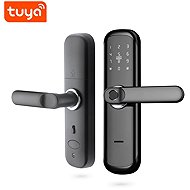
Smoot Air R1
Discontinued

David, Rovné
Rated 07/04/2023, variant Smoot Air R1
Verified purchase
I'm sorry to see how few settings and control options there are for this lock, both in the app and directly on the body of the device.
It is not suitable as a main lock for an entrance door because it does not actually lock, it only disconnects the outside handle and cannot be opened without an entry code or fingerprint. The door is probably easy to break down, as it is only closed by the tongue of the lock. But of course, we are talking about forced entry, which is often not prevented even by much stronger locks.
It is therefore suitable, for example, for an apartment where the entrance is protected by another entrance door, but this again spoils the convenience when I have to unlock the first door anyway. I also encountered a problem with the alarm system in the apartment building, which is (logically) quite loud and one accidentally sets it off once in a while when, for example, one has dirty fingers or a doorknob.
Despite the negativity, the lock serves quite well and when one gets used to it, it almost always recognizes the fingerprint.
easy installation
it looks quite robust and even in use it doesn't give me a cheap impression
basically works as it should
access cards and emergency keys included
solid support through Czech distributor
opening via fingerprint is fast
it really is the cheapest "branded" option you can get
absolute minimum of settings and options, you can't even adjust the volume - the lock either roars like crazy or doesn't make any sound (without audio feedback it's practically impossible to type on the touchscreen)
It cannot be used with Google Home, and probably won't work with other assistants either
All the important settings have to be made directly on the device and are done in much the same way as when we changed something in the settings at the operator 15 years ago - press one for option A, two for option B, etc. everything is in English or Chinese only
it is not possible to unlock remotely, for example to a friend or postman - or it is possible, but even a technology-kissed person has problems with it (first you need to know where the display is, activate it, then you need to tap the code *9#, the application in the mobile comes to the request for unlocking and after confirmation you can unlock - the whole thing takes a lot of time) and it is easier to generate a one-time entry code and send it for example by text message, which is just as annoying
the success rate of fingerprint recognition is definitely not 99%, as I read somewhere - it often fails to recognize me even twice in a row, on the next attempt I have to cover the speaker with my hand, because on the third wrong attempt the alarm is triggered and it is short, but quite unpleasant
small children (in our case 6 years old) have even more problems with opening via fingerprint - it's about 50/50, maybe it's the size of the finger or the fingerprint itself - but the main problem is that not many children can enter the six-digit code, when the fingerprint triggers the alarm
in the end you always have to carry an emergency key with you, which you can always open with certainty - but I admit that in two months of use I have fortunately not needed it yet, although I have already set off the alarm several times after several unrecognised prints
0 ×Report
Automatic translation