
Reviews Rapture FOXTROT ULTIMATE, Gateron Silent Red, black - EN/SK
Interested in reviews of Rapture FOXTROT ULTIMATE, Gateron Silent Red, black - EN/SK? It got 4.3 out of 5 stars from our customers. Find specific customer reviews of Rapture FOXTROT ULTIMATE, Gateron Silent Red, black - EN/SK below. We will appreciate if you also share your experiences with Rapture FOXTROT ULTIMATE, Gateron Silent Red, black - EN/SK after purchasing.
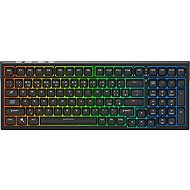
Rapture FOXTROT ULTIMATE, Gateron Silent Red, black - EN/SK
Discontinued

Customer, Chrastava
Rated 07/09/2025, variant Rapture FOXTROT ULTIMATE, Gateron Silent Red, black - EN/SK
Verified purchase
Top notch for the money. It has its BUTs
Silent clicking
size
Wired or dongle or bluetooth
Software
Media module (roller for volume and brightness control, etc. )

0 ×Report
Automatic translation

Ondřej, Praha 4
Rated 04/09/2025, variant Rapture FOXTROT ULTIMATE, Gateron Silent Red, black - EN/SK
Verified purchase
The first time the keyboard stopped working the switch between BL/Dongle/USB and the second time it just completely died, as if it was completely discharged, but it wouldn't charge or report to USB.
quiet
good keystroke
relatively good battery life (since the backlight is useless, I have it turned off)
I have already had to complain twice
backlighting is purely aesthetic and non-functional thanks to opaque keys
plastic body
insufficient instructions
0 ×Report
Automatic translation
Anonymous customer
Rated 06/08/2025, variant Rapture FOXTROT ULTIMATE, Gateron Silent Red, black - EN/SK
Verified purchase
Price performance.
0 ×Report
Automatic translation
Marek, Praha
Rated 01/08/2025, variant Rapture FOXTROT ULTIMATE, Gateron Silent Red, black - EN/SK
Verified purchase - review from a price comparison website
Great keyboard, but it went away after 2 months. High complaint rate. So nothing.
quiet
pleasant to the touch
software
0 ×Report
Automatic translation

Lukáš, Hranice III
Rated 22/07/2025, variant Rapture FOXTROT ULTIMATE, Gateron Silent Red, black - EN/SK
Verified purchase
sound
98% size is ideal
cable in the package
quality keycaps
the plastic construction bends slightly
the keycaps are a bit toothy on the underside and seem to be unfinished
0 ×Report
Automatic translation

Jan, Praha 10 - Strašnice
Rated 09/07/2025, variant Rapture FOXTROT ULTIMATE, Gateron Silent Red, black - EN/SK
Verified purchase
TL: DR: So far I can only present first impressions and probably with time I will reveal the features in more detail. I have to say, though, that the keyboard makes a very solid impression on me overall. Considering the price at Alza Days, the price-performance ratio is really excellent. I find it very pleasant to write and play, very natural, and a big quality improvement from my older Trust drive, which broke down after many, many years of use. Detail: The compactness and at the same time the number of keys including numerics suits me very well for desktop use and will be IMHO practical for transporting as well. I cannot fully assess the battery life yet, but the battery capacity should be parametrically decent (not the best, but good). On a related note, the weight is appropriate - I like to feel the keyboard in my hands. Considering the price, it is understandable that the backplate/frame are not metal but plastic, and thus a bit softer, but with decent handling I believe this will not be a problem. The biggest drawback I perceive as the opacity of the keys, which can be an advantage in good lighting and wireless use - when saving battery without backlighting in good light, the keys are easy to read - but turns into a rather unpleasant feature in poor, low or no lighting, when the lighting goes around the keys, but you practically can not see the character. You have no choice but to adjust the ambient lighting in the room so that you can see the keyboard, unless you have good "muscle memory" and are super used to the keyboard. The packaging is very spartan and probably contributes to the affordable price: braided USB cable, instructions (very brief - only the kl. shortcuts), pliers for removing keys, the keyboard itself. That's all. But the box is nice and looks solid, so it will probably protect the keyboard decently. Overall, I have only relatively minor reservations about an otherwise in my opinion very solid keyboard with an excellent price-performance ratio, specially if it is on sale. Currently I can definitely recommend it.
Very nice, smooth, linear key action. Gateron Silent Red switches are IMHO excellent.
High level of silence.
The keycaps are nicely shaped, have a good profile. The workmanship in this case is, at least at first glance, of high quality.
Compact and numeric at the same time.
Interchangeable keys and switches (hotswap) - I consider this a major advantage.
Combination of wired and wireless connectivity, Win and MacOS compatibility (Ultimate version).
N-Key Rollover and Anti-Ghosting - I will investigate in more detail.
Excellent price-performance ratio.
Opaque keys - in poor or very low light, even with the backlight on, the letters are virtually illegible. I see this as a rather unnecessary and unpleasant mistake.
Torsionally, the body of the keyboard is quite soft, springy - you need to be careful especially when transporting it.
Slow battery charging via desktop PC USB (I'll try a more powerful adapter later to compare the difference).
Switching backlight modes and intensity is a bit annoying, but maybe it's just a matter of habit.
There is no multimedia roller/selector for e.g. volume, but considering the compactness and price I can understand it.
The charging LED is still lit after full charge (green) when connected via USB to a PC - even when the PC itself is switched off. I would probably have to turn off the power to the USB ports in the BIOS when the PC is turned off, which I don't want to do.

0 ×Report
Automatic translation
Pavel, Jedlí
Rated 07/04/2025, variant Rapture FOXTROT ULTIMATE, Gateron Silent Red, black - EN/SK
Verified purchase
Quiet
More compact format than a standard fullsize keyboard
Pleasant to write on
The VIA setup is perfectly sufficient
Somewhat chaotic RGB backlight settings
Opaque keycaps
0 ×Report
Automatic translation
Michael, Ostrava
Rated 18/03/2025, variant Rapture FOXTROT ULTIMATE, Gateron Silent Red, black - EN/SK
Verified purchase
extremely quiet switches
comfortable for typing and gaming
affordability
quality
0 ×Report
Automatic translation

Martin, Dobrá Voda u Českých Budějovic
Rated 05/03/2025, variant Rapture FOXTROT ULTIMATE, Gateron Silent Red, black - EN/SK
Verified purchase
I wanted to enter the world of mechanical keys. Unpacked it was still at a great price of 1800, then the price went up. I plan to buy better silent switches. It is great to write on and extremely quiet and pleasant to listen to.
Gateron Red Silent really quiet switches
Spacebar and enter are as silent as the other keys
Good feel to the touch keys
Option to upgrade switches over time
Option to disable the Win key
Zero tactility, but that's at the cost of switches
0 ×Report
Automatic translation
Anonymous customer
Rated 28/02/2025, variant Rapture FOXTROT ULTIMATE, Gateron Silent Red, black - EN/SK
Verified purchase
After a long consideration I chose my first mechanical keyboard, a brand from Alza, hopefully a good quality-price ratio. I should have paid more for a better brand.
As I have stated in the pluses and especially the minuses.
Software via VIA, but it for some reason doesn't even work (Win10) although it connects but the settings are almost none. How to upgrade the firmware? Alza doesn't even offer alternative keycaps for the keyboard.
Quiet mechanical keyboard
long delivery
looks robust
when connected via USB, the charging indication above the space bar is constantly lit
VIA software connects the keyboard, but some larger settings do not work
the instructions are really brief
lack of custom "functional" software
no firmware upgrade instructions
0 ×Report
Automatic translation