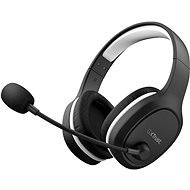
Interested in reviews of Trust GXT391 THIAN Wireless Headset? It got 4.3 out of 5 stars from our customers. Find specific customer reviews of Trust GXT391 THIAN Wireless Headset below. We will appreciate if you also share your experiences with Trust GXT391 THIAN Wireless Headset after purchasing.
Your ears will not fit into it but it's still comfortable
Simple, clean design
Flexible microphone
If out of use/no sound is being played, it will switch off automatically
The on/off button needs to be held for a couple of seconds, feels a bit too long
As it is USB connected, you most probably will not be able use/access built in equalizer
I had to decrease the star rating, as after less than a year, the battery started to degrade - now it's only usable for ~8 hours instead of the advertised 13.
My experience: Today I picked up these headphones at the store, brought them home, charged them up, plugged them in, and my wireless and microphone don't work, so I have to have it through a cable and without a microphone.
This the product is really meant for gaming, not for office usage or conferencing I have been asking TRUST helpdesk on the following 7 questions and I got the following replies! 1. I have a call using headset, fine call ended....headset still paired (as the receiver blue light is not blinking.... I will put the headset over the TRUST stand...tIll how long time (minutes) the headset will be paired? - the product is really meant for gaming, not for office usage or conferencing. There fore it will turn into standby after 15 minutes of no audio input activity. I want to know as incase someone called me to better understand if it will make sound or not! And if it will be going to sleeping mood will it wake up when someone call me on MS teams or I need to switch it on/re-pair it again? - It need to be turned on manually again. The headset will not turn on by itself when in there is an incoming call. 2. HOW to determine the battery level of the headset....i need application... - There is no battery level indication for this model. when the battery is low it will prompt 3 times each 5 minutes and will turn off. and need to be recharged. 3. I need to control the time when the headset may go to sleep/UnPaired (due to inactivity) I need an application please provide one!
- It is not possible to adjust the timing for the headset to turn off, it needs audio input to stay on. 4. Is there is any relation between if the windows got locked after some minutes and the headset paired status!!? If someone called me in MSTeams while the windows is locked..I am expecting the headset will ring(make a sound?) Will it ring? - It will not ring or turn on by itself when the headset is in standby. 5. I need to figure out this as to deciding if I need to charge it or not! Also am I able to connect the headset with USB A-C Cable to charge it while I am having a call ???? Will the microphone will be working? - No this is not possible with this model. 6. For re-charging ....Can I connect the headset to mobile phone charger (Samsung fast charger 5 amp) ...IS IT fast charging?
- There is just standard charging 7. IF connected the headset with the audio cord comming with it into my laptop will the functionality will work (heading/Talking) will the microphone work..or it will be just for listening? - Yes microphone will also work with the included 4pole cable
I was blown away by the quality. If nothing breaks within two years, then this is a great purchase.
You have to remember to put them on the charger, unlike the headphones with the station, but that' s a small thing.
Sound
Microphone
Reach
Comfort
Charging
0 ×Report
Automatic translation
Try our cookies
Alza.cz a. s., Company identification number 27082440, use cookies and other data to ensure the proper functioning of the website and, with your consent, also, among other things, to personalize advertising and the content of our websites. By clicking on the “I understand“ button, you agree to the use of cookies and the transfer of data regarding the behavior on the website for displaying targeted advertising on social networks and advertising networks on other websites.