Interested in reviews of TP-Link TL-WN822N? It got 4.7 out of 5 stars from our customers. Find specific customer reviews of TP-Link TL-WN822N below. We will appreciate if you also share your experiences with TP-Link TL-WN822N after purchasing.
Not recommended for standard gaming PCs. The connection quality is appalling
Wiring is simple
When PC boots up, it does not turn on and you need to disconnect and plug in the USB
Quite frequent micro outages
High latency
0 ×Report
Automatic translation
Milan, Hradec Králové
Rated 12/12/2024, variant TP-Link TL-WN822N
Verified purchase - review from a price comparison website
Easy installation
0 ×Report
Automatic translation
Customer, Tábor
Rated 21/11/2024, variant TP-Link TL-WN822N
Verified purchase
Super
0 ×Report
Automatic translation
Petr, České Budějovice
Rated 10/11/2024, variant TP-Link TL-WN822N
Verified purchase
cable connection, so the antenna can be pulled to a place with a better signal
possibility to direct the antennas
0 ×Report
Automatic translation
Martin, Čelechovice na Hané
Rated 13/10/2024, variant TP-Link TL-WN822N
Verified purchase
I installed on an old PC with Windows 10. The wifi transmitter is "O2 Smart Box V2", coding "WP2-Personal" (personal). Installation instructions and web support are in English.
Good thing I have a camera translation app on my phone!
Installation from the CD is simple. If your wifi transmitter does not have a pairing button, there is no need to install the pairing program that is offered to you at the end of the installation.
After installation from the CD, my network was not found among the wifi networks found. The old drivers on the CD were to blame. You can probably avoid this problem by downloading the latest installation version, which is linked in the instructions.
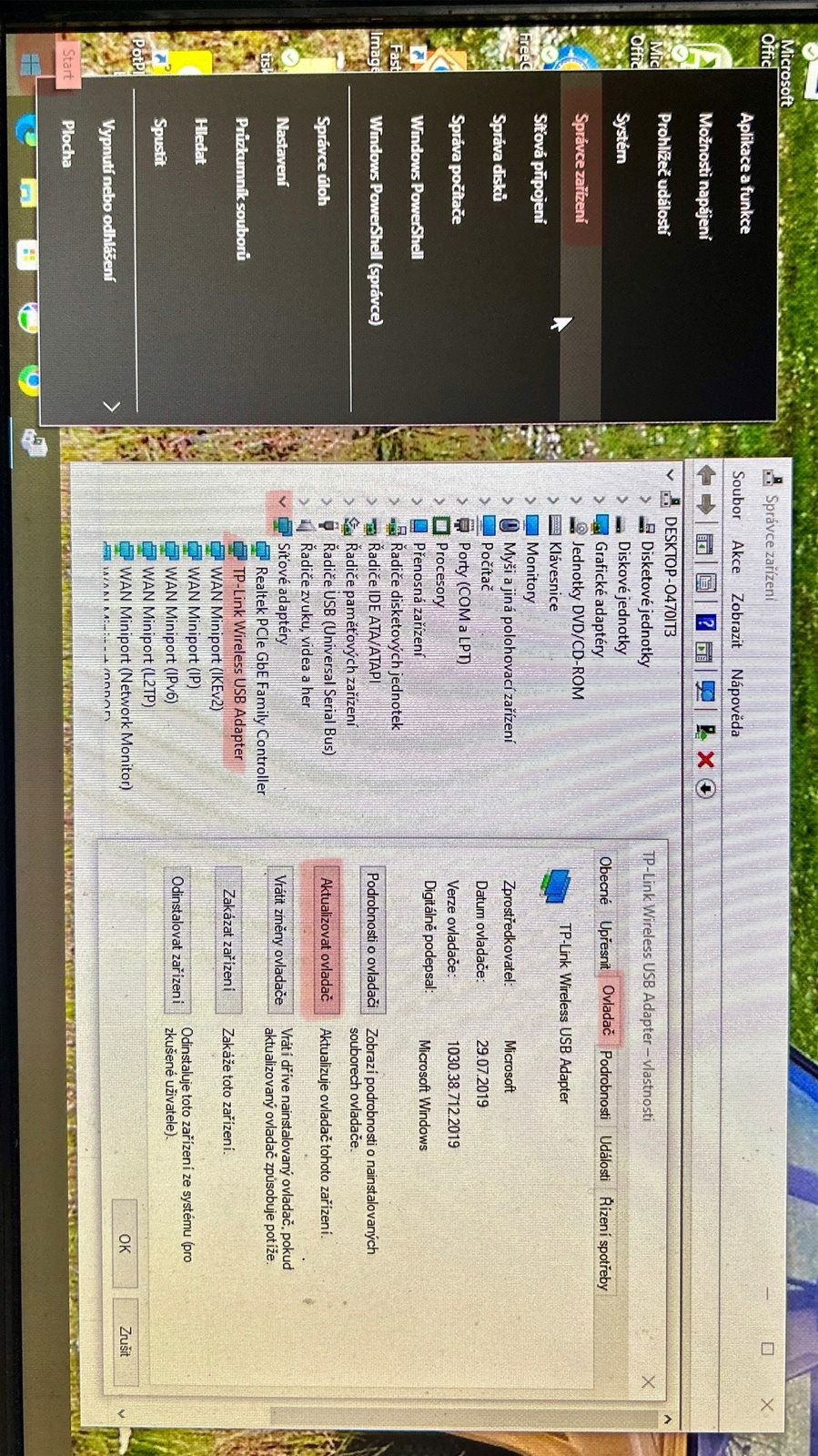
I solved it by updating the driver (the photo shows the unpacked path). Look out! The START button must be clicked with the right mouse button, the left button will give you other options. Open the properties window by either double-clicking or right-clicking and selecting properties from the menu. The temporary internet connection that is needed for this update I implemented via a "personal hotspot".
1.5 m long USB cable
The lower connection speed is balanced by the longer range of the wifi.
Support in English
0 ×Report
Automatic translation
Anonymous customer
Rated 10/08/2024, variant TP-Link TL-WN822N
Verified purchase
Fast installation and good performance
None
0 ×Report
Automatic translation
Pavel, Brno
Rated 03/07/2024, variant TP-Link TL-WN822N
Verified purchase - review from a price comparison website
It works as I needed
0 ×Report
Automatic translation
Jan, Nový Bor
Rated 01/04/2024, variant TP-Link TL-WN822N
Verified purchase - review from a price comparison website
Very good router, good transmission quality and nice design
Nothing detected
0 ×Report
Automatic translation
Václav, Jirkov
Rated 31/03/2024, variant TP-Link TL-WN822N
Verified purchase
compact size
average performance
for the office. needs about OK
0 ×Report
Automatic translation
Try our cookies
Alza.cz a. s., Company identification number 27082440, use cookies and other data to ensure the proper functioning of the website and, with your consent, also, among other things, to personalize advertising and the content of our websites. By clicking on the “I understand“ button, you agree to the use of cookies and the transfer of data regarding the behavior on the website for displaying targeted advertising on social networks and advertising networks on other websites.