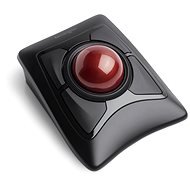
Interested in reviews of Kensington Expert Mouse Trackball, Wireless? It got 4.4 out of 5 stars from our customers. Find specific customer reviews of Kensington Expert Mouse Trackball, Wireless below. We will appreciate if you also share your experiences with Kensington Expert Mouse Trackball, Wireless after purchasing.
Comfortable buttons for both small and large hands
Possibility of 2 devices via bluetooth switching and dongle sources
Unlike other trackballs, the ball is not attached, so it can fall out when you turn the trackball upside down to switch the power or turn off the device
Design à la HAL 9000 was definitely the company' s goal, it may not suit some. The trackball shimmers slightly, but doesn' t cast any glare or anything like that. The pad with the imitation leather design is not particularly nice, it would be better to give it up and just leave the surface smooth. The control can be refined (slowed down) or accelerated using the driver software. The buttons can be set as you wish. Clicking two buttons at once is only good for extra long fingers (I have) and even then it gives me trouble. This is an extremely great thing for the wrist. Can be operated with both left and right hand. The problem of the mouse jerking when trying to click is completely eliminated.
I've been happily using the Orbit trackball for a long time, also from Kensington. I wanted to get rid of the wires on the table, and maybe get something more robust with a bigger ball. I tried the Expert Mouse - it's more robust, but the scroll wheel was louder than my old Orbit from the start, and in that annoying "plastic on plastic" way. Unfortunately, I'd rather keep the Orbit with the wire.
Ergonomically friendly device.
The main minus is that the USB receiver cannot be plugged into (any) HUB, so even e. g. to the USB on the monitor or to the KVM switch. In this case, the PC simply does not recognize it, it only works when connected directly to the PC.
Into a clean environment - the sliding bearings under the ball quickly become clogged with dust and grease, the ball begins to rub.
It needs about the same amount of desk space as I needed for a (precision laser) mouse.
As a result, I have both on my desk, for example, a mouse is simply far more suitable for repeated clicking and dragging tasks.
you get used to it pretty quickly
a different grip than a mouse
DOES NOT WORK via USB HUB
cheap looking scroll ring
sleep mode, from which it wakes up with just a button, but it also sends it to the computer, so you click and you don' t know where in advance
0 ×Report
Automatic translation
Try our cookies
Alza.cz a. s., Company identification number 27082440, uses cookies to ensure the functionality of the website and with your consent also to personalisage the content of our website. By clicking on the “I understand“ button, you agree to the use of cookies and the transfer of data regarding the behavior on the website for displaying targeted advertising on social networks and advertising networks on other websites.