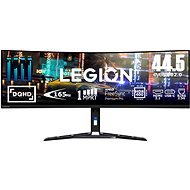
Interested in reviews of 44.5" Lenovo Legion R45w-30? It got 5.0 out of 5 stars from our customers. Find specific customer reviews of 44.5" Lenovo Legion R45w-30 below. We will appreciate if you also share your experiences with 44.5" Lenovo Legion R45w-30 after purchasing.
My second curved monitor for work at home and I am extremely satisfied. I have two monitors side by side at work and it's a trip to prehistoric times. I'll play a game now and then, but I'm not very active, so I probably won't make the most of it in that regard.
Great resolution for work and the ability to have two large windows side by side.
Compared to the older model (Lenovo Legion Y44w-10), it really seems significantly better.
The middle of the screen and the back of the stand are 30 cm apart, so for ideal work you need a table at least 80 cm wide.
I was thinking to put it on a stand attached to the table but during the installation I realized that the stand I found has a VESA a100x100 but the real monitor will be about 100x200. I don't know if or how to do it realistically.
I was looking for a replacement for the existing 2 monitors 27" and 24", which were slowly becoming insufficient and especially the smaller one could not be connected to the MacBook. I didn't want to replace the smaller monitor with another one, so I looked for an alternative instead. I originally had my eye on an OLED monitor, but after comparing the pros and cons, I ended up choosing this one. OLED would have better colors, but because of its primary purpose for work and sometimes long static images, I preferred this one. I'm happy with my choice, I got used to it really quickly and forgot about the original monitors very quickly. Connection is completely seamless to both Mac and Windows 10 and 11. On an older laptop, it may not be possible to use 165 Hz with integrated graphics, but newer PCs with WIn 11 and Mac monitor take full advantage. I have external input switching, so there is no problem with that. All machines run through the Display Port. It was necessary to fiddle with the settings a bit, but after minor adjustments the picture is great. Saving one power socket and lots of cables is also a plus. The original stand takes up quite a bit of space on the desk, but an external monitor mount will solve that.
Great size for work
Quality image
Excellent performance
Very good viewing angles
Great for gaming too - 165 Hz
Slightly higher price
The stand takes up a lot of space - an external holder solves it
For a long time I used two monitors - 27" and 24" - mainly for work. But I still struggled with ergonomics and desk space. That's why I opted for a single Lenovo ultra-wide monitor. Why I chose him:
1) Ergonomics: I need to have three windows side by side while working - one main window in the middle and two auxiliary windows on the sides. It was fine on two monitors, but due to a slightly sprained neck I felt tension and pain after a long time. Now I have everything on one screen, the important window right in front of me, and my neck can rest.
2) Easy Macbook connection: I want to have a clean desk without unnecessary cables and docking stations. Lenovo makes it simple - one USB-C cable provides me with video, audio, fast charging of my laptop, keyboard and mouse via USB dongle in the monitor and Ethernet. I also have the speakers plugged directly into the monitor. Just disconnect one cable and I'm on my way. I don't need the dock anymore.
3) Switching between PC and Macbook: I also have a desktop PC for personal stuff. Thanks to the KVM switch on the monitor, switching between NTB and PC is a matter of one button. USB-C for Macbook, USB-B for PC, and done. It also supports PBP and PIP so I can see both devices side by side. If you're going to use this, I recommend the Synergy utility, which allows for a smooth transition of mouse and keyboard between two systems on one screen. If you want to be online on both machines at the same time on Ethernet, I recommend an external switch. One TP cable to the PC and one TP cable to the monitor. The KVM allows Ethernet via USB to either one or the other. Never both at the same time. But if WiFi is enough for you, you don't have to worry about that. Conclusion:
The Lenovo R45w-30 monitor made it easier for me to work with multiple windows, improved ergonomics and eliminated neck pain, and simplified daily switching between computers. Great picture, rich connectivity, fast charging and built-in KVM. Great for both multitasking and gaming. Be careful, it is really big (110 cm wide). I recommend buying an external mount that can grab onto the edge of the table. That original leg on the table will take up some space.
Excellent DQHD resolution for multitasking (5120x1440)
165Hz and 1ms response time for games
Anti-reflective display, vivid colours, HDR
Easily connect multiple computers (USB-C power and KVM with PBP/PIP) without additional docking in on the desk
Higher price
Lenovo doesn't have a utility to seamlessly transition mouse/keyboard between computers in PIP/PBP - I recommend Synergy
In macOS Sequoia, tiling (splitting windows on the screen) is terribly limited - I recommend the Aerospace utility
HiDPI scaling on external monitor does not work in macOS - if you don't want to sit on macOS with magnifying glass in hand, I recommend BetterDisplay utility
In macOS, you can't control the volume on an external monitor - again, BetterDisplay solves this problem
If you're looking for a monitor primarily for gaming or multitasking, this is a great choice. For normal office work, it's a bit much - the screen width can be more distracting than practical. Anyway, at this price it offers a lot of music for reasonable money
The screen is stunning. 45 inches with 5120x1440 resolution and curvature will literally suck you in. Gaming on this monitor is on another level - the wide field of view gives you the feeling of being inside the action.
Contrast and colours are very good for a VA panel. The blacks are really deep and the image looks vivid. The monitor is well calibrated at the factory, which saves time if you are not demanding colour accuracy
The monitor is huge, which isn't surprising, but the stand takes up quite a bit of space. If you don't have a large table, it can be difficult to position it well
The built-in speakers are a disappointment - they are more suited for emergency use. You'd better have good quality headphones or external speakers ready
I was working on two monitors, but they were getting too much. I was considering a third, but luckily I've discovered 32:9 monitors like this one. I'm not a gamer, so I probably can't use it to its full potential, but regular office work is absolutely amazing on it. Use the free PowerToys app to configure as many standalone, yet easily accessible workspaces of any size you need on your display (Windows). The stand is solid, high quality, but awkward for a regular desk. Fortunately, I have a desk against the wall, so I hung the monitor using a low-profile wall mount (this one is ideal https://www.alza.cz/alzaergo-low-profile? dq=5628192) and is now hovering over my completely free and clear desk. It doesn't stand out too much from the manual, but for full use you need to connect via Display Port or USB-C, HDMI is not sufficient. After registration with Lenovo, the warranty is 3 years.
If you're looking to switch to a single monitor for both work and play, the Lenovo Legion R45w-30 is a great choice. This 44.5-inch widescreen monitor (with a 32:9 aspect ratio) literally stretches across the entire desk, and its 5120x1440 resolution delivers a crisp image that's reminiscent of two 27-inch monitors side-by-side - but without the annoying bezel in the middle. The technical specifications are particularly notable for the 120Hz refresh rate and 1ms response time, which is important for smooth gaming and fast response times even during normal work. The monitor also supports AMD FreeSync Premium Pro technology to help minimize image tearing and improve stability during fast motion. So if you're playing fast-paced action games or watching sports, everything runs smoothly. What made me happy is that now I don't need a side screen anymore. I can view everything on one monitor, from spreadsheets to multiple open documents to watching videos - without losing track or switching windows. For someone who works with multiple tasks at once, this is a real benefit. The design of the monitor is sturdy, which is handy because such a device needs a stable base. Lenovo has also supplied a good stand with height adjustment and tilt capability, so it can be adjusted as needed, although in a small space this can be tricky due to the size. All in all, the Lenovo Legion R45w-30 is a really good quality widescreen monitor. If you're looking for an efficient multitasking solution or an immersive gaming experience, this monitor will fit the bill.
Huge workspace: This monitor completely eliminates the need for a secondary screen. With a wide enough area, you can comfortably work with several windows side by side, which is especially appreciated by multitasking users.
Game Features: The 120Hz refresh rate and 1ms response time deliver smoothness even in faster scenes.
Resolution and image quality: With a resolution of 5120x1440, the image is sharp and detailed, allowing for a pleasant experience when working, playing and watching movies.
Size and space requirements: The monitor is massive and requires plenty of space. It barely fits on a regular desk, which can be a problem in smaller spaces.
Higher price: This is not a monitor for everyone, the price tag is rather higher.
Less optimal for normal office work: This monitor is great for gaming and multitasking, but if you need pure office functions, it may be too big.
0 ×Report
Automatic translation
Try our cookies
Alza.cz a. s., Company identification number 27082440, uses cookies to ensure the functionality of the website and with your consent also to personalisage the content of our website. By clicking on the “I understand“ button, you agree to the use of cookies and the transfer of data regarding the behavior on the website for displaying targeted advertising on social networks and advertising networks on other websites.