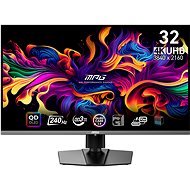
Interested in reviews of 31.5" MSI MPG 321URX QD-OLED? It got 4.7 out of 5 stars from our customers. Find specific customer reviews of 31.5" MSI MPG 321URX QD-OLED below. We will appreciate if you also share your experiences with 31.5" MSI MPG 321URX QD-OLED after purchasing.
Beautiful clear picture, after years on IPS and VA panels I almost fell off my chair.
What is a bit of a nuisance is the burn prevention, but you just have to live with it
Great picture
You have to take care of the monitor - turn it off, regenerate pixels.
Next to my Apple Studio Display, this MSI monitor has a better picture than the one from Apple, so if you've ever considered using an Apple monitor with Windows, for example, this MSI monitor is a straight shot. The aforementioned purple when the monitor is turned off is normal on Oled, however, as soon as you turn it on everything disappears. For me personally, one of the best investments I've ever made for my eyes. I'm considering buying a second one to replace the Apple Studio Display.
Unfinished firmware, at the beginning it was necessary to wait several months for fixes
The backlight is really just a useless accessory, it's not even 1% ambilight
Currently on warranty for the second time due to problems with the KVM switch, I do not recommend this monitor if you want to switch between multiple devices (maybe the next generation will solve this? )
For the price, it could have some decent speakers (but it doesn't have any)
The monitor impressed me with its modern design with relatively thin bezels and also its image quality. I watched a few of his reviews before buying and have no regrets despite his higher price. I use it in conjunction with an nVidia RTX 4090 graphics card, and together they make a great combination for anything from gaming to graphics work. It also supports nVidia G-Sync, which enhances the gaming experience, and the 4090 card is also able to tap into its frame rate potential. Another reason for my satisfaction is the response speed, which is really top-notch thanks to OLED technology. Colours are vivid and accurate, which is appreciated by both gamers and image professionals. Contrast is also top-notch and the blacks are truly black, which makes a big difference especially when watching movies or playing games with dark scenes. I use the monitor both on a PC and in conjunction with Mac OS, where even on a Mac you can set the display frequency in 60, 120, 180 and 240 Hz jumps. The 31.5" screen size provides ample space and great resolution, which contributes to maximum comfort of use. I would recommend the monitor to anyone looking for high quality, whether for entertainment or work. This model certainly meets all expectations and exceeds them.
I've had an MSI monitor for a long time, however this is my first OLED and general monitor above the 10k price tag (decent jump, that). And unexpectedly, I really can't complain about him. 4K resolution with those colours is really beautiful. 240Hz is really top, but apart from a couple of competitive games it's hard to get to that number, luckily the 2K resolution I've been at so far is still cool enough for 332 inches that you can just turn the resolution down a bit. Now the important stuff - beautiful colours, nice stand and control. I'm glad for the usb-c with charging and in general I can't say much bad about this monitor. Only the need for OLED Panel Protect, which occasionally pops up and can't be skipped after 16h, and if you forget it in the middle of an Online Game, it can be annoying. However, you're buying a 35k OLED monitor. You have to reckon that if you want it to last, you have to make concessions. However, this is the only such neutral-negative thing. I recommend
The picture is just great. I have had EIZO IPS panels for many years, but this QD OLED is just something completely different. I use it mostly for office work - I wasn't sure how it would render pixels, but I don't notice any problem at all (which is reported with older OLED versions).
Playing KCD on this monitor is awesome. To control the monitor you need to connect a USB cable - the supplied one is quite short. Panel maintenance ("Panel Protect") takes a few minutes, which can be annoying at times. I'm using with Win 10, monitor scale 175%.
The "Mystic light" on the back of the panel can be turned off.
Perfect image quality. Really.
The monitor is not matte, but it doesn't disturb me in any way - even in daylight.
Great for office work.
Perfection for playing.
The supplied USB cable for setting up the monitor could have been longer.
You can see fingerprints on the monitor - you need to get used to touching it: -)
"Panel Care" starts automatically after some time and takes a few minutes.
0 ×Report
Automatic translation
Try our cookies
Alza.cz a. s., Company identification number 27082440, uses cookies to ensure the functionality of the website and with your consent also to personalisage the content of our website. By clicking on the “I understand“ button, you agree to the use of cookies and the transfer of data regarding the behavior on the website for displaying targeted advertising on social networks and advertising networks on other websites.