
Interested in reviews of 31.5" MSI MAG 321UPX QD-OLED? It got 4.8 out of 5 stars from our customers. Find specific customer reviews of 31.5" MSI MAG 321UPX QD-OLED below. We will appreciate if you also share your experiences with 31.5" MSI MAG 321UPX QD-OLED after purchasing.
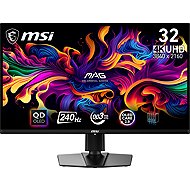
I chose this monitor because I wanted to try OLED technology for the first time, and I was looking for a monitor that would give me a good initial experience without spending too much money on it. One of the pluses is definitely the price/performance ratio. I considered a larger monitor, but after considering the price and the fact that I wasn't sure I would be happy with OLED, I decided on this one. What's typical of OLED and what grabbed me at first is the difference in black on my old monitor and this new one. In general, the colors are definitely one of the biggest advantages along with a very good image smoothness. I spent some time calibrating and trying different settings to make it as comfortable as possible. There are also plenty of options for more demanding users. The only thing that stresses me out a bit is the fragility of the screen itself. I got better microfiber cloths and I'm worried about it not getting scratched.
I thought my previous monitor could display black until I saw black on the MSI MAG 271QPX QD-OLED E2. The colors of this monitor always thrill me whenever I turn it on. For example, Resident Evil 2, Elden Ring or Cyberpunk, etc. the colors are perfect and with a resolution of 2560x1440 it is absolutely beautiful, and all thanks to the fact that the monitor has one of the few OLED monitors with 1000 nits and TrueBlack 400. Admittedly I played around with the monitor's color settings for just over two hours, but the result is well worth it. I especially like the OLED CARE 2.0 function, which can be set by everyone and the monitor will take care of the panel after switching off. It just saves the panel wherever it can. The monitor has no dead pixels or ghosting. The only two things that bother me about the monitor is the LED in the bottom middle of the monitor, which indicates power on in white and from under the monitor it glows a bit, but when I get into playing I ignore it. Another thing is that you can't completely hide the cables, but you can get used to it. The cables are visible because of the great cooling of the monitor, so I'd rather be able to see two cables a bit than have the monitor overheat. The stand is all metal and solid. Overall, the monitor feels like an honest piece of work that meets the requirements of all gamers. For my part, I can recommend the monitor to anyone who wants to enjoy modern games at full blast or gain an edge in competitive games thanks to the 240HZ refresh rate with 0.03ms response time.
I am very satisfied with the monitor. There is no need to describe the basic features of OLED panels - black is really black, high frequency and fast response, large viewing angles, great colours and contrast. You will find it all here. Rather, I'll focus on what you'll find when looking for information about this monitor (or other QD-OLED monitors): Purple glare in intense lighting - I have the monitor in a room where it is not directly next to a window and the artificial lighting is also dimmer and no purple film is visible on the monitor. You'd have to have sunlight hitting it directly to show that (both purple and normal glare, since the panel is glossy and not matte). So for me, satisfaction in this respect. Edges at text - here it is the third generation of QD-OLED panels. I have the native resolution and 125% desktop scaling set and the text is beautifully sharp both on the desktop and in the browser. No jagged edges or coloured borders. Here also satisfaction. The driver installation and firmware update from MSI's website went smoothly. OSD menu is the same as other MSI monitors, controlled by joystick. You can set everything important here. I'd just like to be able to create more custom profiles, both for game and Pro mode, that you can quickly switch between. Something else they could work on in the firmware is the way the monitor notifies the recommendation to perform panel protection (pixel refresh). By default, after four hours of operation, a message will appear in the middle of the monitor where you can either protect the panel immediately or postpone it for another four hours. And that's quite annoying, especially if it happens during an important game moment. If only the message was displayed somewhere near the edge and not right in the middle. Fortunately, this alert time can be switched to 16 hours in the settings, where the monitor will automatically perform a pixel refresh immediately after the monitor is switched off (the implementation is recognized by a flashing LED), if at least 4 hours of operation have already passed. Alternatively, the protection can be started manually in the menu (it takes a few minutes) and the monitor also shows the operating time since the last cleaning. At this setting everything is fine, the panel protection is done after shutdown and the monitor does not bother in any way.
all the benefits of OLED panels
OSD menu could use more care
0 ×Report
Automatic translation
Try our cookies
Alza.cz a. s., Company identification number 27082440, uses cookies to ensure the functionality of the website and with your consent also to personalisage the content of our website. By clicking on the “I understand“ button, you agree to the use of cookies and the transfer of data regarding the behavior on the website for displaying targeted advertising on social networks and advertising networks on other websites.
