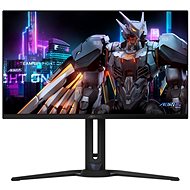
Interested in reviews of 27" GIGABYTE AORUS FO27Q2? It got 4.9 out of 5 stars from our customers. Find specific customer reviews of 27" GIGABYTE AORUS FO27Q2 below. We will appreciate if you also share your experiences with 27" GIGABYTE AORUS FO27Q2 after purchasing.
I chose the monitor for quite a long time, the price difference between the 360 Hz and 240 Hz variant is about 5.000. - up to 10,000. - CZK, so the choice was clear for me. If you're a gamer who exclusively plays FPS titles and wants the best, the 360 Hz option is better. The monitor is not suitable for word processing ( excel, word, spreadsheets, programming etc. ), because of the poor readability of the text. I have a monitor for both single and multiplayer games + I watch movies on it and I'm happy. I think from a price performance perspective this monitor is a solid choice with the features it offers. As for settings, I recommend you put a black wallpaper, put the icons to the center of the screen ( or throw them in one folder), and hide the main panel + set the screen to turn off for 2 minutes. Plus edit windows clear type ( not a massive difference, but at least something). My monitor settings are picture - custom - brightness 80; contrast 55; color vibrance 11 ( the higher you put (up to 20), the richer the colors will be ), sharpness 5, Gamma 2.2, color temp R93 G92 B100, color space - native and in oled care APL stebilize - middle, pixel shift and clean ON. I don't use HDR, I don't like the basic settings and I can't set it up: D
quality product
colours
setup options & joystick
240 Hz
black is black
Freesync and G-sync compatible
Eyesafe, Blue light filter
27" 1440p
monitor protection against pixel burn-in ( manually or automatically)
the monitor gets dirty easily, I recommend not to touch and eat at the PC
for someone the price
text readability is worse ( I'm slowly getting used to it)
the stand is large and on a small desk the keyboard can be a problem
as for the allegedly worse readability of the text, I did not observe anything like that, even when I look at it from five centimeters, that was my biggest fear and it's perfectly fine
beautiful picture
Cable management not much
My eyes irritate me more than the old Dell S2716DG even at reduced brightness, hopefully they'll get used to it
After about 9 years with an LCD monitor (full hd, 60 hz, 1ms) I wanted to get something new, better and more eye friendly. After reading a bunch of reviews, I came to the conclusion that this should be the QD OLED monitor where there should be a wow effect in practically everything. So I turned a blind eye at the price and got this Gigabyte, well for myself I can only confirm it for games and video, where those colors and response speed really have no competition. But for working with text in wine, browser or offices it is worse, the text was harder to read although I tried to adjust every parameter, change preset modes, unfortunately I could not reach the level of the 9 year old monitor. Then in hindsight I realized that all the reviews I read said that QD OLEDs greatly improved text readability compared to normal OLEDs, but only now I realized that it doesn't mean it will be better compared to a normal IPS panel. If someone is looking for a monitor just for games or videos, this one is great, but as a main and only monitor for PC, it wasn't a good choice for me. I returned the monitor and will get a classic lcd IPS panel.
After 2 weeks of use I turned on the old IPS for comparison and unfortunately there is no going back, OLED is the absolute top of the line, now at an affordable price.
Perfect black
Perfect contrast
Beautiful colours
QHD 240 Hz / FHD 360 Hz
3 years warranty incl. burn-in
OLED care
KVM
Risk of burning
Maintenance/prevention required: pixel cleaning, black wallpaper, aut. hiding the bar and turning off the monitor
VESA threads are too small, screws do not fit all the way through
0 ×Report
Automatic translation
Try our cookies
Alza.cz a. s., Company identification number 27082440, use cookies and other data to ensure the proper functioning of the website and, with your consent, also, among other things, to personalize advertising and the content of our websites. By clicking on the “I understand“ button, you agree to the use of cookies and the transfer of data regarding the behavior on the website for displaying targeted advertising on social networks and advertising networks on other websites.