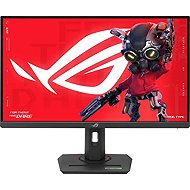
Interested in reviews of 27" ASUS ROG Strix XG27UCG? It got 4.6 out of 5 stars from our customers. Find specific customer reviews of 27" ASUS ROG Strix XG27UCG below. We will appreciate if you also share your experiences with 27" ASUS ROG Strix XG27UCG after purchasing.
Rated 28/03/2025, variant 27" ASUS ROG Strix XG27UCG
Verified purchase - review from a price comparison website
meets the requirements
0 ×Report
Automatic translation
Kristýna, Opava
Rated 19/11/2024, variant 27" ASUS ROG Strix XG27UCG
Verified purchase
** 1 defective pixel, that's why I also returned the monitor ** Slusny picture - good uniformity of backlighting, however, at full white screen it seemed to me that the lower half of the display has a little different feel (a bit like more golden) * Stupid control = only 2 customizable buttons, 3rd button is powerON/OFF and 4th button is Cancel in menu, joystick CANNOT be customized - stupid - at least 2 joystick positions could be customizable; at the same time it was NOT about cust. map button for quick access to brightness settings => for brightness changes. it was necessary to click in the menu ** Average speed of switching between video inputs - this speed also varied according to the source/target: DP -> HDMI lowest measured value 5,6s; HDMI -> DP 4.6s; several times it happened to me that the switchover took up to 8s ** Freezing - I discovered a situation that I was able to replicate repeatedly when the monitor completely froze and did not react for more than a minute: situation.I have 1 PC/NB connected via HDMI (on=free) and another PC connected via DP (on=free). I will now turn off the PC connected to the DP. switching off the PC apparently sends some signal to the monitor, it is put to sleep/shut down.I want to switch now to HDMI i.e. the first PC/NB is still running. not possible, the monitor does not react (to ANY buttons or joystick) and is in an indeterminate state => the solution is either to pull it out of the socket or to wait a few tens of seconds before the monitor "recovers" again ** Backlight/brightness - min. the breeze is very high - unpleasant at night, I found a workaround by adjusting the breeze. to 0 and Color setings to User and set all 3 R G B components to values e.g. 30 or less. it'll make the whole picture even darker; at the same time the bri setting was strange. when changing from 0 to about 50-60% only minimal change of backlighting, from about 60%+ quick change of backlighting ** From ASUS ROG brand I expected more, the whole plastic inaccurately cast, the buttons made "clack"
** for more info you can see a detailed review on YT channel Monitors unboxed
Sharp 4K image
My piece had a faulty pixel
Stupidly designed joystick + cust. buttons
The monitor froze several times and did not respond for a long time
the workmanship could be better
Very high MINIMUM brightness - at night it tears the eyes
Little input (i.e. only 1x HDMI)
0 ×Report
Automatic translation
Try our cookies
Alza.cz a. s., Company identification number 27082440, use cookies and other data to ensure the proper functioning of the website and, with your consent, also, among other things, to personalize advertising and the content of our websites. By clicking on the “I understand“ button, you agree to the use of cookies and the transfer of data regarding the behavior on the website for displaying targeted advertising on social networks and advertising networks on other websites.