
Insta360 X6 ND Filters (ND32)
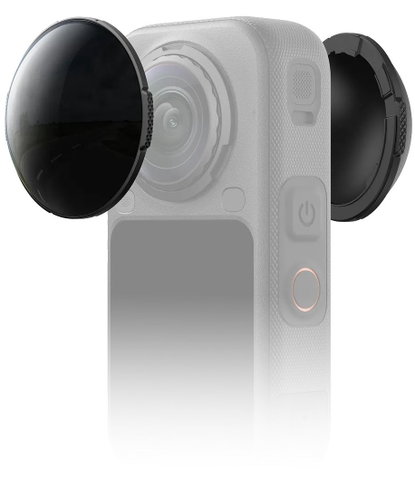
Insta360 X6 ND Filters (ND32)
Insta360 X6 ND filter (ND32)
ND filters help manage challenging lighting conditions while providing greater control over exposure and motion blur in your videos. In bright sunlight, they let you maintain your desired shutter speed and better regulate the amount of light hitting the sensor, which helps prevent overexposure in bright areas of the shot. You can also use a longer shutter speed to create more natural motion blur during fast-paced activities, such as cycling, skiing, or skateboarding. Additionally, the camera automatically recognises an attached ND filter and adjusts its settings accordingly. The filters are made of 7H hardened glass, which also helps to protect the lens.

Key features of the Insta360 X6 ND filter
- Exposure control in bright ambient light
- Maintains desired shutter speed
- Reduces the risk of overexposure in bright areas
- More natural motion blur for smoother footage
- Suitable for dynamic activities and fast movement
- Automatic filter detection by the camera
- Automatic setting adjustment based on the filter used
- 7H hardened glass
- Lens protection during use
Film in any light
Switch between ND16, ND32, and ND64 filters to always get the ideal exposure for the current lighting conditions.

ND16 – 4 stops
Reduces the amount of light entering the lens by 4 f-stops and is suitable for less intense daylight, such as on an overcast day.
ND32 – 5 stops
Reduces the amount of light by 5 f-stops and is ideal for moderately bright daylight, for example on a partly cloudy day.
ND64 – 6 stops
Reduces the amount of light entering the lens by 6 f-stops and is designed for bright lighting conditions, such as on a sunny day.ND filters – smoother motion and exposure control
The Insta360 X6 ND32 reduces the amount of light entering the lens by 5 f-stops and is perfect for moderately bright conditions, such as on a partly cloudy day. It lets you work with a longer shutter speed and create a more natural motion blur, making your footage look smoother and more cinematic. At the same time, it helps maintain a balanced exposure and reduce overexposure in the bright parts of the image.

Stable exposure in bright light
ND filters help you maintain your desired shutter speed even in very intense light, such as on snow, open water, or in the harsh midday sun. By limiting the amount of light entering the lens, they make it easier to control exposure and help preserve details in bright areas of the image without unwanted overexposure.

More natural motion effect
ND filters let you use a longer shutter speed for dynamic scenes to create more natural motion blur. This makes the movement appear smoother and more dynamic, rather than like a series of frozen frames. The effect is particularly useful for cycling, skiing, skateboarding, and other fast-paced activities.

Automatic filter recognition
The camera automatically recognises an attached ND filter and adjusts its settings accordingly. There's no need to manually enter the filter parameters, which simplifies camera setup and lets you get back to shooting faster.

Hardened glass and lens protection
Each ND filter is made of 7H hardened glass, which also helps protect the camera's lens during use. The filter thus combines light control with an extra protective layer for the sensitive optics.

Instructions for use
- Place the ND filter on the camera lens and turn it clockwise to tighten it securely.
- Once correctly installed, the camera will automatically display a notification on the touchscreen. Then select the corresponding ND filter model to ensure correct image correction and accurate colour reproduction.

Important usage notes
Do not drop the ND filters or subject them to strong impacts or contact with hard surfaces, as this may cause damage. If a filter is damaged, it must be replaced. Before installation, always ensure that the filter, camera lens, and surrounding area are clean and dry. Only mount the filter in a clean, dry environment and always screw it on firmly and correctly before use. Before attaching the ND filter, remove the lens guards and store them safely for future use. When installing, avoid applying excessive pressure or pulling on the filter's base to prevent deformation or damage. ND filters may slightly affect image stitching, so for best results, it is recommended to point one lens at the main scene. Do not use the filters in the rain or for water sports, as they are not waterproof. If the filter comes into contact with rain, snow, or fog, dry it thoroughly with a soft cloth to prevent it from fogging up. The ND filters contain magnets, so keep them at a sufficient distance from pacemakers and other sensitive devices. The camera will only display a notification if it correctly detects the filter on the display side. The filters use magnetic sensors for recognition, and incorrect installation may cause the camera to mistake the filter for another accessory. In such a case, reinstall the filter correctly.
Package contents of the Insta360 X6 ND Filters (ND32)
- 2× ND32 filter
- 1× storage case
- 1× cleaning cloth
Technical specification
- Type: ND32 filter
- Effect: 5 exposure stops
- Weight: 7g
- Dimensions: Ø43.71×13.03mm
- Material: plastic, glass, metal, adhesives
Specifications
Filter type
Diameter
Other features
Optical density
| Code: | Insta360c2a7 |
| Warranty: | 24 months |
| Links: | Producer's Website: |