
Fujifilm Instax SQ Link White
 Price Guarantee
 Installment calculator
4,9%
interest
from 3.45 € monthly
Installment calculator
4,9%
interest
from 3.45 € monthly
Fujifilm Instax SQ Link White
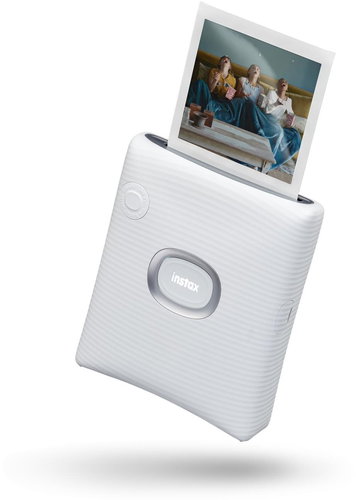
The Fujifilm instax SQ Link White Mobile Printer lets you print photos from your mobile phone wherever you are. In addition, it tunes them to perfection. Using your smartphone, you can activate QR codes that bring photos to life with special effects. INSTAX Rich mode adds brightness and colour to images, while INSTAX Natural ensures a natural look. There is an LED strip on the front of the printer that alerts you to the mode and status of the application, and a function button. You can also send photos via INSTAX Connect to other users via the SQUARE Link app. They can also be decorated with labels, filters or stickers and prepared for printing.
Key Features of the Fujifilm instax SQ Link White Mobile Printer
- Compact mobile printer
- Allows you to print photos from your mobile phone
- INSTAX Rich mode adds brightness and colour to images, while INSTAX Natural ensures a natural look
- An LED strip on the front of the Fujifilm instax SQ Link printer alerts you to the mode and status of the application
- The SQUARE Link app allows you to send photos via INSTAX Connect
- SQUARE Link app offers a variety of photo-enhancing modes
- Allows you to capture and print any moment from the video
- Offers fast repeat printing
- Printing from the Fujifilm instax SQ Link is easy
- Colour design: white
Fujifilm instax SQ Link enhances your photos
Before you decide to print your photo in the Fujifilm instax SQ Link printer, you can enhance it in various ways using the available modes. AR Print mode adds a new dimension to your photos by scanning a QR code with your phone, while Special FX mode lets you add animations to your photos. You can also add a personal message, a translucent colour block, add contrast or a drawing to the photo. There is also the possibility of decorative frames or creating collages. Photos can also be decorated with stickers. You can choose from hundreds of stickers with different text.
Fujifilm instax SQ Link Printer prints quickly and easily
SQUARE Link app allows you to capture and print any moment from the video. It also offers fast reprinting. With the button on the front of the Fujifilm instax SQ Link, you can print one photo multiple times in a row for use in a card or party invitation, for example. There's a lot you can change with photos. You can crop the image, change the contrast or saturation, and apply a filter. Once you connect to SQUARE Link using Bluetooth, just swipe up and print. It's really easy. Fujifilm instax SQ Link turns your moments into unforgettable experiences.
Dimensions:
12.75 × 10.5 × 3.75 cm
Weight:
236 g
Specifications
Type
Function
Connection
Supported Paper Sizes
Dimensions
Equipment
Colour
| Code: | OF953a1a |
| Warranty: | 24 months |
| Links: | Producer's Website: |