
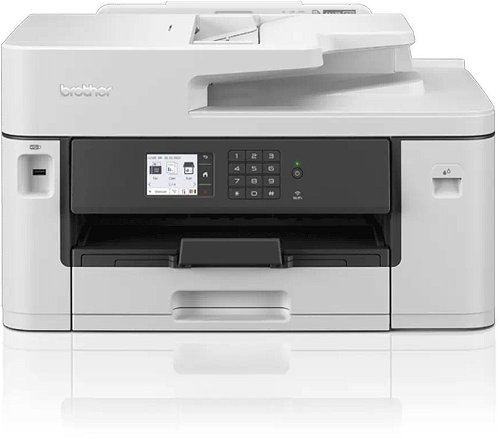
Brother MFC-J2340DW

 Installment calculator
4,9%
interest
from 4.44 € monthly
Installment calculator
4,9%
interest
from 4.44 € monthly
Brother MFC-J2340DW
The MFC-J2340DW professional A3 multifunction printer is built to meet the needs of demanding customers. The A3 function lets you print both A3 and A4 colour documents in high quality, at high speed, and with low running costs. This multifunction device offers printing, copying, scanning, and faxing. Print from your desk, in a meeting room, or from your mobile device with a wireless connection.

Key features of the Brother MFC-J2340DW inkjet printer
- Print (up to A3), copy, scan and fax functions
- Print speed of up to 28ipm in mono and colour (in accordance with ISO/IEC 24734)
- Automatic A4 double-sided printing
- Wired and wireless connectivity
- Mobile compatible with the Brother Mobile Connect app
- 6.8cm colour touchscreen
- 250-sheet paper capacity
- 50-sheet ADF and manual feed slot

Brother MAXIDRIVE print technology and long-term durability
You need a device you can rely on. These professional A3 multifunction devices have been engineered to deliver fast, secure, and professional quality to meet the growing needs of your business. The newly developed high-performance print head significantly increases print speed, saving you time when printing business documents. Not only has the speed increased, but this new print head is also highly durable and produces outstandingly high print quality, giving your outputs a professional feel.

Stay connected, always
You don't have to be sitting at your desk, or even near the printer, to use the MFC-J2340DW. With a range of connectivity options available, you can print anywhere in your office or home – and even from your mobile phone via a wireless connection. By downloading the Brother Mobile Connect app, you gain access to a whole host of features, from sending print jobs to checking your ink levels and ordering supplies.
Print and scan technology to improve your workflow
With full-colour A3 printing, your documents will stand out and can be more easily digested, helping you in your work. By printing A3 documents in-house, you have more control over your deadlines and can expand your opportunities. The MFC-J2340DW does much more than just print. The available scanning options can significantly increase your productivity when working from home. You can scan in colour or mono at high speeds to multiple destinations to improve your workflow – image, file, OCR, email.

Package contents:
Consumables, device, power cord, quick setup guide, product safety guide, user guide
Technical specification:
Internal memory: 256MB
Printer functions: N-up printing, poster printing, ID printing, booklet printing, print profiles, watermark printing
A4 single-sided print speed mono and colour: 28 images per minute
A4 double-sided print speed mono and colour: 21 images per minute
First print out time: Mono (4.4 seconds) and colour (4.6 seconds)
Printer and scanner drivers: for a full list of supported OS and to download the latest drivers and software, please visit support.brother.com
A4 single-sided copy speed colour: 16 images per minute
A4 single-sided copy speed mono: 25 images per minute
Copy resolution: Up to 600×600dpi
First copy out time from ready mode: colour (6.0 seconds) and mono (5.0 seconds)
Greyscale: 256 shades of grey (8-bit)
Copy functions: 2 on 1 ID copy, multiple copy/stack/sort, enlarge/reduce %, N in 1 ID copy, enlarge text copy
Scanner type: CIS (Contact Image Sensor)
Scan resolution: interpolated up to 19200×19200dpi, optical 600×600dpi (mono and colour on scanner glass), 600×600dpi (mono via Automatic Document Feeder – ADF).
Colour depth: output (24-bit colour processing), input (48-bit colour processing)
A4 single-sided scan speed colour and mono: 25 images per minute
Standard scan functions: scan to (email, file, image, OCR, SharePoint, FTP, network, searchable PDF, SharePoint (on Premise))
Scanner profiles: 5 preset network
Fax: PC fax send and receive, paperless receive, ECM (Error Correction Mode), broadcast, auto reduction, greyscale, memory transmission
Product line management tools: LAN/WAN management software (DO NOT USE - BRAdmin), unattended installer, MSI installer, embedded web server, driver deployment wizard
Paper input: manual feed slot (1 sheet), standard tray 1 (250 sheets), automatic document feeder (50 sheets)
Paper output: A3 (50 sheets), A4 (100 sheets)
Acoustic power printing: Mono <6.78B(A), Colour <6.82B(A)
Acoustic pressure: Printing (51.5dB)
TEC value: 0.17kWh/week
Specifications
Type
Function
Connection
Supported Paper Sizes
Scanning
Printing parameters
Dimensions
Equipment
Colour
Package includes
Services
| Code: | PB201g6a |
| Warranty: | 24 months |
| Links: | Producer's Website: |
| Manufacturer information |
Brother CEE GmbH, branch office, Veveří 102, Brno 616 00, Česká republika 
|