
Reviews Xiaomi Watch 5 Juniper Green
Interested in reviews of Xiaomi Watch 5 Juniper Green? It got 4.3 out of 5 stars from our customers. Find specific customer reviews of Xiaomi Watch 5 Juniper Green below. We will appreciate if you also share your experiences with Xiaomi Watch 5 Juniper Green after purchasing.
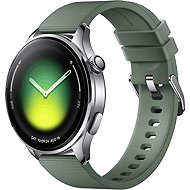
Xiaomi Watch 5 Juniper Green
In stock > 5 pcs
293.29 €
Add to Cart

Jiří, Chodov
Rated 27/07/2026, variant Xiaomi Watch 5 Juniper Green
Verified purchase - review from a price comparison website
Large display
Number of functions
0 ×Report
Automatic translation

Dušan, Ústí nad Labem
Rated 19/07/2026, variant Xiaomi Watch 5 Juniper Green
Verified purchase - review from a price comparison website
Light
Sports
Water resistance
Controllability
0 ×Report
Automatic translation

Václav, Semice
Rated 01/07/2026, variant Xiaomi Watch 5 Juniper Green
Verified purchase
Battery life, despite running WearOS, is probably the best it can be on WearOS; what’s more, it offers the benefits of this system
a second operating system in power-saving mode
Geminy AI! top!
OLED
The strap is pleasant/comfortable, even though it’s made of silicone, but I’ll replace it with a leather one in time, for a better look and feel and greater comfort
So far, it’s been reliable after 10 days; notifications are OK so far
reliable payments
Charging isn’t wireless, but the contacts are still making a good connection for now; with the TickWatch5 I had, it was always playing up. So far, so good – reliable
Unfortunately, the first pairing is causing problems because the device is running an old operating system that needs updating. Skip pairing, after the update, pair again: ) this needs to be surpassed; then it’s all about reliability
0 ×Report
Automatic translation
Anonymous customer
Rated 14/05/2026, variant Xiaomi Watch 5 Juniper Green
Verified purchase
I will try to write here everything that I would be interested in before buying and is often not mentioned in all kinds of reviews.: I use the watch with the following features: Connection to the phone via BT - nonstop, WiFi - off, brightness automatic, screen off - after 5 seconds, Allways on displays - off, notifications - mirroring the phone, arrival of notifications - lights up the display, sleep tracking - extended with breathing rate, heart rate measurement - all day, stress level measurement - all day, SPO2 measurement - all day, gesture Light up when tilting - on, other gestures off. That's how they suit me best so far. With this setup, I'm getting 3 days of battery life in smart mode (1. I charge the day in the evening and have to charge on the 4th day in the evening). I was at 70+% in economy mode after 4 days. The main differences between smart mode and power saving mode are that in power saving mode there is no possibility to use additionally installed applications (e.g. when I play music on my phone, I can't control it on my watch). Another little thing is that not all emoticons are displayed in notifications. Otherwise, they work the same in power saving mode, i.e. notifications are coming, the measurement works both at night and during the day and during exercise. Pairing with the phone is fine, the values in the mobile app sync quickly, I haven't found any problem in this. Worse is the watch settings, where something can only be set in the watch and something only in the phone. However, once I had it set up the way I was most comfortable with, I didn't touch the settings anymore. I was worried about the automatic brightness according to the reviews, but it works perfectly for me. Brightness high in sunlight, brightness low in darkness. Only with the long sleeve covering the left part of the watch there is a problem - the sensors are probably in the left part of the dial, so when the sleeve covers my watch even 1/4, the watch senses it as if I am in the dark. After the first boot, 2 system updates immediately, which together took over 4 hours. You need to charge your watch during the update. At the beginning I found the system a bit stuck, the animations were slightly stuttering, but after 2 days it seemed to settle down and since then everything has been smooth. Notifications can either be mirrored from your phone or you can choose only from specific apps. When doing exercises using GPS (when you want to map a route) you have to wait a while for the GNS signal (when you want to record the route from the beginning, it takes a few seconds) otherwise you can start without it and after a few seconds it will catch on. As for the sync between the watch and phone, the alarm set on the phone is not reflected in the watch app, but it works - the watch picks up and sounds and the alarm can be turned off via the watch! The Do Not Disturb setting on the phone is again not translated to the watch - it has to be set in the watch as well (a small thing, one swipe up and one click). When I receive a call on my watch, the sound comes from the watch, but as soon as I make a call on my phone, e.g. I turn off the microphone, the call is redirected to the phone and I haven't found a way to put it back on the watch (this was just an experiment, I don't use it at all). When listening to music, a music note symbol appears on the watch face, and when you click on it, the music controls are displayed - song name, time, option to skip or rewind the song, volume control with the crown. The navigation set on the phone projected onto the watch only works via Google maps so far. The only thing I'm a bit sorry about is the unsupported ECG and picture display, where so far only in Whatsapp and in messages you can see a preview of the picture - you can't click and zoom. In other apps (gmail - not even preview, not even with install on watch, messenger - not possible of course, when it is not supported on watch systems). Replying to messages is not only possible on messenger. The only "BUG" I've encountered that pisses me off is that when I have an event with a long name (multiple words) in my calendar, the notification of the upcoming event gets stuck on the main screen - admittedly it's just a thin strip with the name of the event and doesn't even prevent the time from showing, but it just gets in the way and a restart is required. All in all, they meet everything I expected from them. 5/5.
long update after first start
0 ×Report
Automatic translation
Daniel, Praha 8 - Kobylisy
Rated 10/05/2026, variant Xiaomi Watch 5 Juniper Green
Verified purchase
large display with excellent luminance
many dials but .
GPS
Google pay payments
wear axle
the image on the watch through the camera of the mobile phone
offline maps
vibration at max vibrates beautifully
notifications - voice, text with smileys
volume super
on wear axis good endurance
settings on the mobile phone are not transferred to the watch
silent mode setting on all devices at the same time is enabled but does not work
the dials do not update according to the app even the next day (steps, calories), sometimes they are completely shallow
google maps can only be seen when zoomed in, hopefully the update will fix it
ecg is not supported by us
0 ×Report
Automatic translation

Ondřej, Praha
Rated 28/03/2026, variant Xiaomi Watch 5 Juniper Green
Verified purchase
perfect watch for wear axes with great battery life.
large display
fast response
interestingly solved power saving mode, which makes the watch a dumber device, but with extreme battery life
payments, replies to notifications
fast charging
automatic brightness control sometimes gets confusing, with Watch 2 Pro it was a bit better
charging by a peoprietary wheel with contacts
0 ×Report
Automatic translation
Anonymous customer
Rated 17/03/2026, variant Xiaomi Watch 5 Juniper Green
Verified purchase
Hodinky mě celkem překvapily jednak tím jak hezky vypadají a kvalitou materiálu tak i poměrem cena vs výkon. Zatím vše funguje jak s wear os má s tím že nějaký buk se občas najde ale jsou na trhu krátce tak se časem opraví. A nejvíce se mě líbí jejich výdrž kdy se v chytrém režimu pohybuji kolem 4 dní a to si s něma dost hraju zatím ......v hloupém jsem ještě nezkoušel . Měl jsem samsung watch a ty jsem nabíjel každý druhý den někdy i denně. Měření aktivit jsem zatím zkusil jen chůzi a kolo a neshledal jsem žádný problém. Odchylky neřeším pro orientační info v pohodě gps ve městě v celku kopíruje terén přesně. Mapy.com jsou funkční a vykreslují se rychle. Telefonování a notifikace fungují dobře, jen to chce vše poladit s telefonem a vše povolit. Za mě spokojenost jsou svižné na ruce hezké a dělají co mají.
hezký design
safírové sklíčko
pouzdro nerezová ocel
výdrž baterie
offline mapy
svižný systém wear os
platba přes nfc
dvoupásmová gps
gemini
kvalitní řemínek s kovovou spounou
funkční mapy.com
jsou nové tak ještě nejsou úplně odladěné ale vše funguje jak má


0 ×Report
Tomáš, Ostrava
Rated 13/09/2026, variant Xiaomi Watch 5 Black
Verified purchase - review from a price comparison website
Display and battery life
Too big for me.
0 ×Report
Automatic translation

Zdeněk, Praha 9, Černý Most
Rated 08/09/2026, variant Xiaomi Watch 5 Black
Verified purchase - review from a price comparison website
happy, battery life, does ECG.
0 ×Report
Automatic translation

Pavel, Lukavec
Rated 01/09/2026, variant Xiaomi Watch 5 Black
Verified purchase
The weak point here is Wear OS. I've received several updates since buying it, but there are still a lot of bugs in the system. I tried using payments from the start and I've only had a problem once, right after an update (I just had to restart the watch and it was OK). The battery life is about 2.5 days with normal use (I don't have all the sensors turned on for maximum measurement).
hardware
card payments (Google Wallet)
possibility to install applications
Notifications arrive whenever they feel like it.
alarm clock - sometimes it freezes and can't be turned off, and when selecting "vibrate only", it often vibrates just once and then stops = it might not wake you up at all
You can't lock the watch when you want to; the watch locks itself after a while once you take it off your wrist. I'd often need to lock it while sleeping or during certain activities.
Calls - the watch has all permissions enabled, I can answer a call on the watch, but the microphone and speaker are still used on the phone and I haven't found how to set it up anywhere.
0 ×Report
Automatic translation