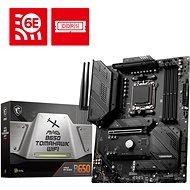
Interested in reviews of MSI MAG B650 TOMAHAWK WIFI? It got 4.6 out of 5 stars from our customers. Find specific customer reviews of MSI MAG B650 TOMAHAWK WIFI below. We will appreciate if you also share your experiences with MSI MAG B650 TOMAHAWK WIFI after purchasing.
On BIOS version 7D75v1E from 21.2. 2024 + Corsair 32GB KIT DDR5 6000MHz CL30 Vengeance Grey EXPO In the BIOS set "Memory Context restore" enabled Everything works so far even with AMD EXPO stable and PC boots faster.
For Ryzen 7800X3D luxury
Clouds of USB ports
Easy installation of all drivers at once
Corsair 32GB KIT DDR5 6000MHz CL30 Vengeance - everything works stable even AMD EXPO on BIOS version > 7D75v17
It's working so far, so we'll see in the future: )
I wanted a board for the Ryzen 7800X3D, and this was my final choice after studying 3 weeks of videos (it says 12/2023).
Plenty of USB outputs in the back, some boards are significantly worse.
Decent BIOS, but that's standard nowadays. I consider myself more of a layman tuner, more of a gamer, and maybe that's why I have nothing to complain about the board.
3x M.2
For some, the absence of PCIe 5.0, but I don't think it's worth paying for more expensive boards these days (01/2024), given the prices, the difference in practical performance, and the availability of PCIe 5.0 components in general, just for PCIe 5.0 and maybe skipping this solid board because of it.
MSI could have put heatsinks in all three M.2 slots, but for someone who buys an M.2 drive straight with a heatsink, this might be an advantage that one slot on the board does not have a heatsink: )
I use the board with 7800X3D and 7900XTX, after two weeks of use no problems.
3 M.2 slots
abundant and well-placed fan connectors
integrated IO shield
maybe a small thing, but you'll appreciate it when building - the USB 3.0 connector is in a good place and it's flat, so it's not nearly as annoying to plug in
BIOS flash function
abundant USB connectors
less important, but very sympathetic design
in basic settings boot up to over a minute - could be attributed to the AM5 platform, for significant reduction to about 20 seconds you need to enable "Memory Context Restore" in BIOS
minor thing, but when using a larger GPU, the CMOS battery is unavailable
MSI are always my clear favourites when choosing components, they satisfy my demand in terms of aesthetics as well as functionality. In my time of existence, they have never once let me down - I have never had a component fail (Once a broken PCIe, but that was probably my doing: D). I also recommend it to all "newbies" in the gaming computer industry who want to build their first gaming computer without unnecessary complications, or use the service from the guys from Alza, namely the PC configurator.
Three m.2 slots
AM5 ddr5 configuration
A board designed for high-end components
Beautiful matte black design
Without RGB backlight
Sufficient number of USB connectors, 2x3.2, 4x3.0, 2x2.0
Wifi 6E
After BIOS flash and subsequent configuration, the board searched for all possible drivers for the installed components = easier work.
One of the m.2 drive slots lacks heatsinking, it detracts a bit from the aesthetics
Alza.cz a. s., Company identification number 27082440, use cookies and other data to ensure the proper functioning of the website and, with your consent, also, among other things, to personalize advertising and the content of our websites. By clicking on the “I understand“ button, you agree to the use of cookies and the transfer of data regarding the behavior on the website for displaying targeted advertising on social networks and advertising networks on other websites.