
Reviews Logitech Wireless MX Ergo
Interested in reviews of Logitech Wireless MX Ergo? It got 4.6 out of 5 stars from our customers. Find specific customer reviews of Logitech Wireless MX Ergo below. We will appreciate if you also share your experiences with Logitech Wireless MX Ergo after purchasing.
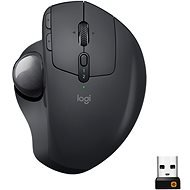
Logitech Wireless MX Ergo
Discontinued

Anonymous customer
Rated 14/10/2024, variant Logitech Wireless MX Ergo
Verified purchase
Super, pohodlne a rychle
Velmi rychlo sa spini koliesko a treba ho rozoberat castejsie ako som zvykol iny mys
0 ×Report

Customer, Nová Dubnica
Rated 20/07/2022, variant Logitech Wireless MX Ergo
Verified purchase
quality product assembly, quality material. Very high positioning accuracy
I highly do not recommend buying. I used the trackball until its first battery drain. Then, when trying to charge the trackball, it did not react at all. Service ordered that there are physical damage. Accordingly, the product is not subject to warranty service. I have been a regular user of Logitech products for fifteen years. This is my first negative experience. I am extremely disappointed
0 ×Report

Dávid, Bratislava
Rated 13/02/2022, variant Logitech Wireless MX Ergo
Verified purchase
I have had this mouse, trackball, for the second year in a row and I can' t praise it. It has excellent ergonomics, button personalization options and sensitivity. Features of software that provides file transfer across connected devices (win to win, but also win to mac and vice versa), the ability to personalize buttons for individual applications, etc. they are sensational. Due to its shape and positionability, my hand no longer hurts and I do not feel the onset of a carpal tunnel, even though I work with it for 8-12 (sometimes more) hours a day. There are only two things I would like to tell her.1 Since I often carry it across workplaces, I have no choice but to carry a USB receiver in my wallet or cam. 2 The sensor is located at the bottom under the trackball and often needs to be cleaned of dirt. It might help to move the sensor to a higher position.
Ergonomics
personalization of buttons in the application
quality workmanship
connectivity to two devices and easy switching between them even without application
USB storage
0 ×Report
Automatic translation

Ľubomír, Bratislava
Rated 02/01/2022, variant Logitech Wireless MX Ergo
Verified purchase
Excellent innovation
Ergonomics
Variety of materials
Size
connectivity
High price but matches the quality
0 ×Report
Automatic translation

Pavel, Bratislava
Rated 21/06/2021, variant Logitech Wireless MX Ergo
Verified purchase
trackball
Ergonomic. even if it's only 20%
battery life
I miss another extra button on the edges, one or two
not backlit: )
0 ×Report
Automatic translation

Katarína, Miloslavov
Rated 27/11/2019, variant Logitech Wireless MX Ergo
Verified purchase
mouse angle adjustment works by tilting over the edge and has 2 positions - normal and tilted, while the whole mouse is magnetically attached to the metal plate
holds well
the bottom of the mouse/metal plate is rubberized
contains a magnet
the wheel and the buttons can be felt - it's not a complete disaster, but there are quieter mice
the hole from the bottom to squeeze the ball is smaller and it can not be done with a finger, but it is only necessary when cleaning
in daily office use, my Logitech mice have always lasted just until the end of the warranty - the button always goes away, similar to cheaper mice, so the price/performance ratio.
0 ×Report
Automatic translation
Peter, Bratislava - Petržalka
Rated 02/07/2019, variant Logitech Wireless MX Ergo
Verified purchase
You don't have to move your hand at all
It's a terrible habit to have your hand in place and do everything with your thumb, with your thumb you then make an unusual movement, it's a habit, but with a classic mouse it's much easier.
0 ×Report
Automatic translation

Vladimír, Bratislava
Rated 05/07/2018, variant Logitech Wireless MX Ergo
Verified purchase
Quality of workmanship
Wheelbarrow
Possible button settings
Tilt
USB dongle/Bluetooth
The thumb is more loaded than the mouse
Long hours of work cause "rigidity"
0 ×Report
Automatic translation
Jan, Praha 4
Rated 13/08/2024, variant Logitech Wireless MX Ergo
Verified purchase - review from a price comparison website
After testing it for a week, I can see the benefits - it' s an extreme change in grip and hand movement, so if you spend a lot of time at the computer, it' s a relief for the whole arm from the shoulder down. I alternate with a mouse and it' s another piece to the whole ergonomic puzzle.
It probably won' t be very comfortable for small hands, but I' ve always looked for big mice.
Accuracy is great, but I wouldn' t see it for gaming. FOR the office / graphics, etc., absolutely fine. Oh, and thanks to zero movement, you don' t need that much space on your desk.
complete relief from the mouse
very accurate and comfortable after getting used to it
two tilt positions
At the beginning, " strange" control when one is used to a mouse
0 ×Report
Automatic translation
Svatopluk, Praha 10 - Kolovraty
Rated 20/03/2024, variant Logitech Wireless MX Ergo
Verified purchase
I purchased the mouse as an alternative to a traditional mouse. I wanted a device that would have Bluetooth connectivity. In the package you will also find a USB dongle to insert into the USB A connector on the device. Many people find this mouse strange, but it's very usable for graphics - both vector and bitmap editors. I also appreciate the fact that you can connect the mouse to two devices simultaneously and switch between them with a button directly on the mouse. The biggest drawback I consider to be that there is no storage space in the body of the mouse where you can insert the USB dongle and is thus doomed to lose or misplace it.
Charging is very interesting - the manufacturer states that a fully charged mouse lasts 4 months on a single charge. And if you run out of power, after 1 minute of charging you get 8 hours of work. When you arrive in the morning to a completely drained mouse and before you make coffee or tea, you're charged for several days. Charging is also related to the presence of a Micro USB cable in the body of the mouse, USB-C would suit it better. Overall, I rate the mouse very well, but the shortcomings mentioned are nothing that should discourage anyone from buying it.
This is a mouse for the so-called. "Oldschool" teachers, who remember the time when the so-called. trackballs.
Works in Linux too
Bluetooth and Unify connectivity using the supplied USB A dongle
When discharged, charging in units of minutes to work throughout the day
Easy cleaning of the trackball
HW switch for connection to two devices
Can be tilted to 0 or 20 degrees.
Precise cursor control for graphics applications (with DPI change via HW button)
Pleasant mouse surface to the touch
Centre wheel swing to the side
Working with a PC puts a different strain on your muscles than a traditional mouse
Connectable to mobile phones and e.g. to smart TVs or games consoles
No "hiding place" for Unify USB dongle directly in the mouse body - risk of loss
Unify dongle on USB A connector only
Positioning in 2 positions only
A unique device with a unique price
Micro USB charging connector in the mouse
0 ×Report
Automatic translation