
Reviews Legion Go 8AHP2 1TB Eclipse Black
Interested in reviews of Legion Go 8AHP2 1TB Eclipse Black? It got 4.4 out of 5 stars from our customers. Find specific customer reviews of Legion Go 8AHP2 1TB Eclipse Black below. We will appreciate if you also share your experiences with Legion Go 8AHP2 1TB Eclipse Black after purchasing.
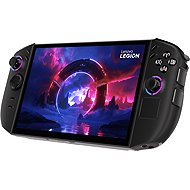
Legion Go 8AHP2 1TB Eclipse Black
Discontinued

Tomáš, Děčín
Rated 12/03/2026, variant Legion Go 8AHP2 1TB Eclipse Black
Verified purchase
The ideal companion for long journeys and couch sessions, where it can also serve as a tablet and laptop with a fantastic display. Everything is subordinated to the large OLED, which is the main driver and reason to buy. The ideal size, when one is already drawn into the action and does not notice the surroundings. You need to think if you really "need" it. If you just want something to kill time on the train for half an hour on your commute, the Steam Deck is the obvious choice. This is more of a longer session. Thanks to its weight and size, you're already thinking about taking it out of your backpack. Although it is a weaker variant of the Z2 processor, I don't think the performance is lacking and it doesn't make much sense to pay extra for a more powerful variant (the difference is more in efficiency than in maximum performance). Everything that runs on Steam Deck will run here (just at a higher resolution and 144Hz). Hades 2, Hollow Knight, etc. handheld games with absolutely no problems. In the case of the latest AAA games, where even the RTX 5090 gets sweaty, it's understandably worse and we need to wait a few more generations. However, thanks to VRR, the lower and fluctuating FPS is not eye-popping and it's easy to get used to. After all, consoles have also been running at 30 FPS for years. Only FSR 3 support is disappointing (but that's the way it is with AMD). At maximum load, you need to count on an endurance of slightly over an hour. It doesn't matter to me, I always play at the socket anyway. This is associated with more heating, but nothing tragic. But the passive fan mode isn't even enough for browsing the internet - so the fan runs practically all the time. To put it in the case, you really need to turn off the device - when you put it to sleep, it sometimes turns on spontaneously and "fries" in the case. Windows is exactly as we know it, with all the pros and cons. But it supports basic gestures like Android. It's worth considering a SteamOS dualboot when there is support directly from Lenovo. I recommend creating two profiles for the drivers - one for Windows with multimedia buttons for YouTube etc. and the other default for games. What's a bit of a bummer is the wobbly left-hand controller, but that's the price of being able to take it off. It can be solved with electrician's tape and a little bit of clearance. Even with my piece, the RT + RB buttons rub together slightly when pressed. But I don't notice it when I'm playing.
Sufficient performance for common handheld games
Unrivalled OLED, HDR, 144 Hz display (especially after calibration)
32GB RAM
Option to remove the drivers
Windows
Switchable RGB flashers
Apart from a few details, it feels solid in the hand
Noise comparable to a regular laptop
2x USB-C
Initial setup and configuration of the BIOS, instructions are needed
Windows
It's not quite AAA, but it can be
FSR 3 only
Lacking quality of workmanship even in later pieces
Lenovo ballast
0 ×Report
Automatic translation

Company
Rated 26/11/2025, variant Legion Go 8AHP2 1TB Eclipse Black
Verified purchase
This is my first handheld - I've been debating which way to go for a long time. In the end I was convinced by OLED and I really don't regret it. The versatility of this device suits me fine - with the Full Screen Experience, the console is great to use and there's not much to fault. The initial startup and setup was admittedly tedious (I recommend going through a few tips from 128KB's YouTube video), but now I'm having trouble getting the device off my hands.
Only a few pieces of the first production batch have these bugs (at least according to Reddit and YT videos), but overall the device is great and I definitely have to recommend it - I finally started to enjoy playing games again.
Display - OLED, HDR, VRR, 144Hz
Overall impression of design and ergonomics
Performance even for normal Z2 version, 32GB RAM
Overall impression of design and ergonomics
Fingerprint, speakers, cooling, detachable controllers
Case in the package
Initial start-up and update is about 2 hours
Mura - invisible when playing
Simultaneous pressing of RT + RB slightly jerks
Triggers need to be calibrated - I have 5 - 80% travel
Sleep deprivation after buying this device: D
0 ×Report
Automatic translation

Vladislav, Pňovice
Rated 31/10/2025, variant Legion Go 8AHP2 1TB Eclipse Black
Verified purchase
I would definitely recommend the console just because of the really beautiful OLED display. The colors are great. The speed of the whole system is fast and agile. We'll see in time when more disk space fills up. For me overall satisfaction
Beautiful huge OLED display(maybe a disadvantage for some)
Everything loads terribly fast
Expandable by SD card
Charger and case included
Compared to legion go 1, the cooling noise is a big improvement
The speakers are top quality, beautifully clear sound
The console feels great in the hand compared to the Legion 1
2x USB C
The battery though is 75Wh so at AAA play so an hour 10 minutes
Price
The case could be better(but it is at least in the package)
The console is quite heavy but I expected worse
The BIOS is set to 2GB VRAM, you need to manually adjust
Windows is still not made for handheld consoles
0 ×Report
Automatic translation
Pavel, Slaný
Rated 27/10/2025, variant Legion Go 8AHP2 1TB Eclipse Black
Verified purchase
Great Image
Good ergonomics
Agility
Complete satisfaction
Just Lenovo
Windows
It's hard to find protection for the display
0 ×Report
Automatic translation
Anonymous customer
Rated 04/10/2025, variant Legion Go 8AHP2 1TB Eclipse Black
Verified purchase
Misleading information, this model is not as powerful as stated, moreover it does not include 890M graphics at all as in the description, but the old 780M !
0 ×Report
Automatic translation
Martin, Most
Rated 29/09/2025, variant Legion Go 8AHP2 1TB Eclipse Black
Verified purchase
Beautiful oled image
It comes with a charger and a case
Even when playing for a long time it doesn't get too hot
Run all the latest games
The battery is more powerful, but it gives an hour of full power.
Still underperforming you'll be all about the details
The equipment is again quite heavy and large
You need to adjust the settings in the bios and assign more memory to the graphics
0 ×Report
Automatic translation