
Reviews Keychron K5 Max Swappable Gateron RGB Backlight Brown Switch - CZ/SK
Interested in reviews of Keychron K5 Max Swappable Gateron RGB Backlight Brown Switch - CZ/SK? It got 4.7 out of 5 stars from our customers. Find specific customer reviews of Keychron K5 Max Swappable Gateron RGB Backlight Brown Switch - CZ/SK below. We will appreciate if you also share your experiences with Keychron K5 Max Swappable Gateron RGB Backlight Brown Switch - CZ/SK after purchasing.
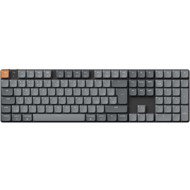
Keychron K5 Max Swappable Gateron RGB Backlight Brown Switch - CZ/SK
Currently Unavailable

Michal, Praha 10
Rated 04/08/2026, variant Keychron K5 Max Swappable Gateron RGB Backlight Brown Switch - CZ/SK
Verified purchase
If you're looking for a low-profile, wireless, full-size mechanical keyboard, there isn't that much choice. I don't want Logitech anymore, too many of them have died on me. So I'm trying out Keychron and I'm pretty thrilled so far.
The brown switches are just right. I spend 80% of my time gaming and 20% writing, so it's an ideal compromise. A pure gamer would probably go for the Red version. But the advantage is that the switches can be swapped without soldering and are standardised, so you can get a complete set for around 1,000 CZK. I also appreciate that you can take a switch out, blow it clean (we have cats) and, if necessary, replace just a single one. Where a Logitech would have been a write-off, here you can simply operate and carry on 😉
quality workmanship and materials
Ideal switches for writing + gaming
minimalist design and size
Overall, it has been working perfectly since I first plugged it in.
possibility to change switches
0 ×Report
Automatic translation

Anonymous customer
Rated 01/08/2026, variant Keychron K5 Max Swappable Gateron RGB Backlight Brown Switch - CZ/SK
Verified purchase
A quality mechanical full-size keyboard, there aren't many of those around. The linear RED switch felt slightly quieter and lighter to press (by about 5g) than the tactile BROWN, but both are relatively quiet. This is my first mechanical keyboard, so I don't really know what to expect, but the BROWN has a tactile bump before actuation, so you think you've pressed the key, but you haven't yet. Personally, I didn't like that, so the RED was the clear choice. On top of that, the caps lock indicator on this particular unit didn't work, probably a manufacturing defect, so I ended up returning it (to opt for the RED switches) but I'd still rate it quite positively.
Connection via Bluetooth (up to 3 devices), 2.4G dongle or cable
Nice Czech localisation (unfortunately, due to the placement of the LED in the switch, the diacritics don't light up)
Nicely done RGB backlighting (all the keys are transparent, although the brightness is quite low)
The dedicated Caps Lock indicator, which others criticise because the Num Pad has a backlit key when activated, is something I actually prefer. It's closer to the caps lock key and it's visible, even during the day, which the num lock activation, for example, isn't really. It's usually off anyway because there's no need to type in caps lock.
I really like the orange Esc key, but for those who don't, there's a grey one in the box too.
I appreciate that you can configure it in the browser without having to download unnecessary applications. Most of the backlighting can also be set using keyboard shortcuts.
Low backlight brightness compared to other keyboards, which isn't necessarily a bad thing. It's perfectly visible in the dark, but you can see almost nothing during the day.
My first experience with tactile BROWN switches. It felt like the bump came before the actuation point, so I'd think the key had been pressed when it hadn't yet. I don't know what it's like with other tactile switches, but I didn't get on with these.

0 ×Report
Automatic translation
AGEPRA Ostrava s.r.o., Ostrava
Rated 30/07/2026, variant Keychron K5 Max Swappable Gateron RGB Backlight Brown Switch - CZ/SK
Verified purchase
Given that I work at a PC, and also spend my free time at a PC, the low-profile Logitech MX keyboard was a blessing. Unfortunately, it wasn't great for gaming, but even so, it withstood some pretty rough treatment for 3 years. Once you get used to low-profile keyboards, you don't want to go back to the high-profile ones. You can always raise a low-profile keyboard, but lowering one is much harder, if not impossible. The Corsair K100 AIR Wireless keyboard was my dream one. A low-profile mechanical gaming keyboard, with the exact key layout I wanted (gaps between the F1-F12 keys, no extra buttons on the sides). Unfortunately, after just a month of use, I realised that the durability of the keys wouldn't last long. The keys no longer felt as smooth and were creaking. From numerous reviews, I understood that I would destroy the keyboard in no time. So, at least for gaming, I started looking at another keyboard and ended up buying the Logitech G915 X LIGHTSPEED. I tried it for about 2 days and even though it didn't suit me, I concluded that I couldn't buy anything better at that moment and unfortunately, I kept it. The keyboard itself isn't bad, it's nice, good quality, not too high. But the tactile buttons are only good for gaming, and not even always then. I've never had so many misclicks on any other keyboard. I curse the keys on the left side, and the longer I use the keyboard, the more I hate them. On top of that, the charging behaves crazily; when I unplug the keyboard or just turn it off and on, it immediately has 10 to 20% less battery and starts charging straight away. It's been doing this since I bought it, I even tried exchanging it and the second unit did the same thing. So if you want to use the keyboard wired to save the battery, you'll actually put it under even more strain.
When I couldn't take it anymore and got a Keychron K5 Max Swappable Gateron RGB Backlight Brown Switch, I soon found out that you can be happy for half the price. When you switch to wired use with the button, the battery isn't used at all. The setup via a web browser is great, and compared to those crazy applications from Logitech and Corsair that clog up your computer, I had everything set up in 15 minutes. The Brown switches are great even for typing, although I wouldn't mind if the press was a bit more definite. I definitely don't recommend Red switches for typing. The backlighting isn't as pronounced and nice as on the Logitech, but I don't have the keyboard for show, but to earn a living on it and for it to be comfortable to work with. And the fact that the Czech characters aren't as well lit, well, when you need to see them you can, and the other keyboards didn't even have them, so for me it's just a plus. Most gaming keyboards are US layout only. The Num Lock indicator can be configured and is clearly visible when you use different colours. I don't mind the Caps Lock indicator, which is next to Esc, it's clearly visible and near Caps Lock (in fact, I notice it's on sooner). The keyboard is great for gaming and for work. For my part, I didn't expect to be this satisfied and I can recommend it.
Probably the best keyboard when it comes to battery life, build quality, and price.
Low Profile
programmable (easily via a web browser) (you set the keys, backlighting, and everything is saved to the keyboard)
No need to install any stupid software just to set up my keyboard
It doesn't have any programmable keys on the left side like the Logitech G915 X LIGHTSPEED (no more misclicks, finally)
Gaps between the F1–F12 keys
Lasts for years, not months like the Corsair K100 AIR Wireless RGB
Small, no borders around the keys, takes up much less space on the desk compared to others.
Replaceable keycaps and switches
decent backlight
With Brown switches, you can game and type pretty well.
Unfortunately, it's not as low as the Corsair K100 AIR Wireless RGB, but it feels lower than the Logitech G915 X LIGHTSPEED.
Because it doesn't have any borders, I sometimes catch the corner of the keys, but then again it has a small footprint and the keys are holding up more than perfectly so far.
0 ×Report
Automatic translation

Kamil, Prusinovice
Rated 29/05/2026, variant Keychron K5 Max Swappable Gateron RGB Backlight Brown Switch - CZ/SK
Verified purchase
I have long been looking for a replacement for the outdated Logitech G910 (Logitech never again, horrible quality). I wanted backlighting, high Enter, separate function keys into blocks, user keys and a spare design. I also wanted both Shifty longs, but you can't get that with CZ anymore, so I passed on it.
The keyboard is great, I am satisfied. It writes perfectly and is quiet (not like a diaphragm, of course, but against the G910 it's a treat).
The setup is done via the website https://launcher.keychron.com/. It took me a while to find my way around, as the options are vast (there is a demo mode on the web that works without a keyboard connected ). You can also flash the firmware via the web. Connection is easy with a single click, it uses the USB Web Api (note. I use Windows).
In the photos the white backlight is at maximum, one photo during the day and the other in the evening at dusk.
Quiet
It remembers the settings and doesn't need running SW to do it (it needs SW if you want to set up custom applications to run), so there's no problem with KVM.
Great configuration options
Very pleasant to write
The switches are not recessed, so they won't stick in there (absolute hell with the G910)
Included keys for MAC, USB receiver and key cap removal tool
4 user keys
The configuration can be exported/imported, so it's not a problem if you mess something up
Connectivity via USB-C, BT and USB dongl
It has no frames, so it takes up little space
Different backlighting modes for some, I'm fine with monochrome: -)
Spacing between key blocks could be a few mm bigger, it takes some getting used to
Setup via the web, so if (or when? ) they're gonna shut it down, so probably bad luck
The backlight is not visible during the day. An evening when you need to see them. Enough, but it could have been stronger
Czech characters are not backlit
Somewhat illogically, CAPS lock has a control via diode (next to ESC), but Numlock has it solved by underlining


0 ×Report
Automatic translation

Michal, Jablonec nad Nisou
Rated 20/07/2025, variant Keychron K5 Max Swappable Gateron RGB Backlight Brown Switch - CZ/SK
Verified purchase
the keyboard is in one word absolutely amazing, tactile keys are perfect, the material of the keys is top on the market, beautiful backlighting with great variability of settings, aluminum chassis is absolutely rigid and the keyboard does not move on the table
processing
material
response
0 ×Report
Automatic translation
Michal, Kolín 2
Rated 31/05/2025, variant Keychron K5 Max Swappable Gateron RGB Backlight Brown Switch - CZ/SK
Verified purchase
I'm not a gamer and I use the keyboard with macOS and BT connection. Everything is absolutely perfect, although Logitech or Apple keyboards wake up from sleep faster. I have the Czech version, which has ABS keys (not PBT), unlike the American version. For me, this is a big advantage because they are backlit, although for Czech characters the backlighting is not very noticeable. Unfortunately, the backlight is RGB only, so pure white cannot be set. The keyboard is superbly crafted and an incredible joy to type on. I'd buy it again anytime.
Fantastic typing feel, ideal key depth, good response
Czech localization
Perfect customisation options
Long battery life.
Quality workmanship
ABS keys with backlight
RGB backlight, white would be better
0 ×Report
Automatic translation