
Reviews HP ProBook 465 G11
Interested in reviews of HP ProBook 465 G11? It got 4.6 out of 5 stars from our customers. Find specific customer reviews of HP ProBook 465 G11 below. We will appreciate if you also share your experiences with HP ProBook 465 G11 after purchasing.
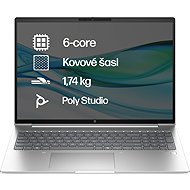
HP ProBook 465 G11
Currently Unavailable

František, Ústí nad Labem
Rated 08/03/2025, variant HP ProBook 465 G11
Verified purchase - review from a price comparison website
A nice branded machine for reasonable money that lacks nothing for productive workloads, is hardware balanced, can be maintained and has expandable memory. On the AMD processor I say: Heureka. It's not HP's fault that there isn't much choice in the operating system department today. It never has been, the Windows ecosystem has a cruel inertia - it's just the other side of the coin: For work deployments, let's be glad for a strong unifying OS. In the end, Windows can be made to look like itself quite well.
The Probook 465 fits the "I'm not so rich that I can afford to buy cheap stuff" principle, while at the same time it doesn't overflow with self-serving glitz. In other words: a worthy successor in the HP Probook family. For me, it wins as a basic office machine for work deployments and as a shared home machine for the family.
A suitable bag is e.g. Dicota D30805.
The current eleventh generation has a larger display format: 1920x1200 (instead of the previous full-HD 1920x1080 noodle) - the previous generation had this in the EliteBook
backlit keyboard
metallic gig Ethernet
The current generation has again slightly easier access through the bottom blanket inside - screws are back, not such an annoying struggle with plastic packs as in previous generations = easy access due to RAM expansion etc.
two channels of RAM, each with a SODIMM slot (memory is factory-fitted into both slots and is 16 GB which is currently enough for windows - 8 GB is not enough)
Windows PRO is a little less brash with the timing of updates, and of course has some of the features required for deployment in companies with centrally managed IT (domain)
The chassis is partly metal
It may even have the factory default F-keys (they behave "computer-like" by default)
A full-sized numpad fits on the keyboard.
AMD Ryzen hexa-core - a very cool processor. It doesn't get too hot and it can handle even moderately demanding workloads.
Lez connect two external displays = this notebook serves as a pretty solid workstation.
Unfortunately, keyboards with a reasonable layout and spatial shaping died years ago. Weird chiclet creations will always be with us. Get an outdoor keyboard for work.
Windows has factory-branded bloatware. However, there is probably nothing that can be done about this with pre-installed machines and it is not specific to HP. Fortunately, the worst of the ballast can be uninstalled - unfortunately, it's extra work to get settled in.
The 11s have several "improvements" in the GUI compared to the 10s, which cost extra clicks during normal operations (e.g. context menu in explorer). Personally, as part of the settling in process, I'm resetting a few things to less annoying behaviour, fortunately it can be done.
0 ×Report
Automatic translation