
Reviews Eternico Wireless Keyboard KSB3250 CZ/SK
Interested in reviews of Eternico Wireless Keyboard KSB3250 CZ/SK? It got 3.8 out of 5 stars from our customers. Find specific customer reviews of Eternico Wireless Keyboard KSB3250 CZ/SK below. We will appreciate if you also share your experiences with Eternico Wireless Keyboard KSB3250 CZ/SK after purchasing.
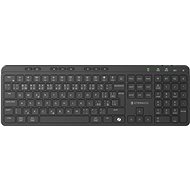
Eternico Wireless Keyboard KSB3250 CZ/SK
Discontinued

Pavel, Liberec 15
Rated 06/10/2025, variant Eternico Wireless Keyboard KSB3250 CZ/SK
Verified purchase
I had 5 times I claimed even after 3 claims with the same glitch (skipping keys) alza did not automatically refund my money. I had to call 3 times to make sure they didn't send me another sixth piece.
It feels solid and is a pleasantly heavy keyboard I really don't recommend.
Battery life he about 12 hours
Omits spacebar, ctrl, and about 6 other keys
0 ×Report
Automatic translation

Company
Rated 07/05/2025, variant Eternico Wireless Keyboard KSB3250 CZ/SK
Verified purchase
see how long he lasts
price/performance
quiet
low key travel
Built-in rechargeable battery
weight does not travel on the table
harder press of the function keys on the top edge prevents accidental pressing when overloading
space bar does not work on edges resp. you really have to squeeze harder, this is very noticeable
numeric keypad layout?! what's the "=" for?
on the numeric keypad, the + and - are swapped
there are errors in the instructions ... (Window if the author meant the operating system is missing the "s")
the computer lock does not work according to the instructions (press and hold for 1 second) it would be great sometimes you knock it off by mistake when typing on the nanumeric keyboard
FN+ESC on Windows is not a keyboard lock, but is used to permanently switch between the F1-F12 function keys and the Multifunction keys
The meaning of FN+ F6-F11 doesn't make sense to me (on the contrary, I would appreciate multi-function programmable keys or e.g. for calculator, clipping, etc. )
Win/Mac switch
0 ×Report
Automatic translation

Lukáš, Karolinka
Rated 03/04/2025, variant Eternico Wireless Keyboard KSB3250 CZ/SK
Verified purchase
Refunded money, claim processed very quickly
Pairing
Quickly resolved complaint
Key layout and Win + Mac support
Space bar only functional in the middle
Enter was sometimes unresponsive
0 ×Report
Automatic translation
Anonymous customer
Rated 26/03/2025, variant Eternico Wireless Keyboard KSB3250 CZ/SK
Verified purchase
Quiet
Lightweight
Easy connection
Space bar sometimes skips
0 ×Report
Automatic translation

Tomáš, Dobříš
Rated 02/03/2025, variant Eternico Wireless Keyboard KSB3250 CZ/SK
Verified purchase
Aevidently, it's a feature. I don't recommend
Low Profile
Slow to react
Does not respond well to the space bar
0 ×Report
Automatic translation

Eva, Slavkov u Brna
Rated 25/02/2025, variant Eternico Wireless Keyboard KSB3250 CZ/SK
Verified purchase
Quality workmanship
Easy pairing
Great stamina
Numeric keypad
My own batteries (I don't feed pencil batteries)
Rubber feet (holds well on desk while writing)
Higher weight
It seems a little higher overall
0 ×Report
Automatic translation

Jaroslav, Praha 4
Rated 05/02/2025, variant Eternico Wireless Keyboard KSB3250 CZ/SK
Verified purchase
A pleasantly heavy keyboard, the keys have low stroke and stiffness like they used to on a laptop, so anyone used to typing on a laptop will have a similar feel. USB-C charging is great, saves on battery replacement. Connection via dongle and Bluetooth works well. I have the keyboard connected to my PC and tablet and switching is easy.
The price-performance ratio is high for this keyboard. Wireless keyboard with Bluetooth and USB-C charging costs twice as much as classic brands
It's quite heavy, it won't move on the desk even when typing quickly. However, some people may consider this a disadvantage, for example, it is too heavy for travelling.
The space bar must be pressed more than other keys, otherwise it doesn't work. I suppose it's just a fault with my piece.
The keyboard has a key for quick AI recall, but the manual doesn't say under what conditions it would work (OS, programs...)
0 ×Report
Automatic translation
Jakub, Třebíč 1
Rated 20/01/2025, variant Eternico Wireless Keyboard KSB3250 CZ/SK
Verified purchase
The biggest negative I see is that the keyboard falls asleep quickly. That in itself would still not be a problem. The problem is that it often does not register a key stroke when it wakes up, ironically the first one registers, but the second one does not, the next one does. The other big negative is the space bar, which doesn't register a keystroke at all on the edges. The other negatives can be accepted after a while. It has been universally mentioned in other reviews. Because of the "equals" key, the other characters for mathematical operations are shifted compared to 99% of other keyboards. I welcome the Copilot button, but not at the expense of the true Control. Unfortunately, the price and other pros do not outweigh the negatives mentioned.
Price
It's quite nice to write on
Li-ion battery (although capacity could be higher)
Design
Sleep mode
Spacebar
Narrow Enter
Numeric characters
Copilot key
0 ×Report
Automatic translation
Otto, Praha 4 - Podolí
Rated 10/01/2025, variant Eternico Wireless Keyboard KSB3250 CZ/SK
Verified purchase - review from a price comparison website
easy operation
0 ×Report
Automatic translation
Anonymous customer
Rated 30/11/2024, variant Eternico Wireless Keyboard KSB3250 CZ/SK
Verified purchase
I am unfortunately disappointed with the keyboard and will be returning it. I confess that I type much better on my laptop keyboard, which is no miracle either, but.
I'm a developer, I type thousands of keystrokes a day on the keyboard and I simply need it to fit, which unfortunately didn't happen here.
The worst part is the space bar, which doesn't respond to sideways presses, so I miss a space between every other word and am unable to type fluently, just keep going back and filling it in.
All the keys for mathematical functions are shifted around the numeric block, because there is an added =
And the narrow enter is just the icing on the cake.
Maybe the keyboard isn't so bad, but this just outdid everything else.
unfortunately I didn't find anything positive
The space bar does not respond to pressing on the sides (more than a centimeter on each side), only when you hit it very hard. This is probably the most annoying thing and I'm not able to function with the keyboard.
For the numeric block, the = button has been added above 8, so that all the buttons for mathematical operations have been moved one position and + occupies only one position. Another annoying thing, unfortunately I didn't notice it in the photo
Narrow enter, lower part narrower than the classic key
0 ×Report
Automatic translation