
Reviews Eternico Wired KD2001L - CZ/SK
Interested in reviews of Eternico Wired KD2001L - CZ/SK? It got 4.1 out of 5 stars from our customers. Find specific customer reviews of Eternico Wired KD2001L - CZ/SK below. We will appreciate if you also share your experiences with Eternico Wired KD2001L - CZ/SK after purchasing.
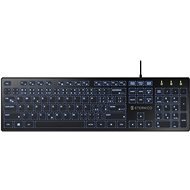
Eternico Wired KD2001L - CZ/SK
In stock > 10 pcs
11.90 €
Add to Cart

Martin, Bratislava
Rated 04/02/2022, variant Eternico Wired KD2001L - CZ/SK
Verified purchase
Typing sometimes causes typos, due to the great depth of keystrokes, which I would not expect from a low-profile membrane keyboard.
The price is favorable, but I was looking for a quiet and low-profile / chiclet backlit keyboard (the ideal is the hp notebook keyboard, where you can hardly hear any keystrokes or touches) as a replacement for the basic 10 € keyboard for a PC. I definitely do not recommend if someone is looking for a better and quiet option.
If someone does not have a keyboard, then in addition to the backlight, this keyboard is also average within its price range. After typing a review on this keyboard, I' m going to return it.
price
when typing it is not quiet at all, the sound of fingers falling on the keys (“tapping“) is loud as with any other keyboard. When pressed harder, it is also completely loud than a regular keyboard (unlike e. g. HP notebook integrated keyboard)
I would not call the keys low-profile - they are lower than with a mechanical / standard keyboard, but compared to any laptop keyboard (or comparison with another low-profile keyboard) it is an abysmal difference.
the fn key for multimedia keys is on the opposite side of the notebook, making it impossible to add / remove volume with one hand
0 ×Report
Automatic translation

Pavel, Praha 411
Rated 07/10/2026, variant Eternico Wired KD2001L - CZ/SK
Verified purchase - review from a price comparison website
The backlighting is subtle, sufficient mainly for complete darkness, for a reasonable price.
Good value for money (compared to similar models)
Clear layout (with a numeric keypad)
Good key response (on all keys)
The Z and Y keys are only labelled for the QWERTZ layout.
The backlight can't be adjusted to match the actual environment.
0 ×Report
Automatic translation

Marie, Praha
Rated 01/09/2026, variant Eternico Wired KD2001L - CZ/SK
Verified purchase - review from a price comparison website
I needed a working keyboard ASAP, which this one provides as expected – it's cheap and it works.
Stable on the table (thanks to the rubber feet)
Backlight
Legible labels (without backlighting, from a wider angle)
Clear layout (with a number pad, with separate arrow keys)
Uncomfortable to write with (due to the stiff grip)
0 ×Report
Automatic translation
Zdeněk, mikulčice
Rated 04/07/2026, variant Eternico Wired KD2001L - CZ/SK
Verified purchase - review from a price comparison website
Good value for money: ), well-made, with a nicely backlit and quiet keyboard for just a few arrows.
Low price
Quality workmanship
Quiet and practical
Nice backlight
0 ×Report
Automatic translation
Matěj, Praha 6
Rated 16/06/2026, variant Eternico Wired KD2001L - CZ/SK
Verified purchase - review from a price comparison website
A cheap and attractive keyboard
The blue backlight makes it harder to find your way around
Quite tall keys
0 ×Report
Automatic translation
Jaroslav, Kutná Hora
Rated 14/06/2026, variant Eternico Wired KD2001L - CZ/SK
Verified purchase - review from a price comparison website
it could do with a brighter backlight
0 ×Report
Automatic translation

Pavel, Brno 35
Rated 23/05/2026, variant Eternico Wired KD2001L - CZ/SK
Verified purchase
11/10 don't recommend, I struggled on this keyboard for about half a year. The keys are flat, the press is unsure and, moreover, they have been spared absolutely everywhere. This is most evident on the large keys, such as enter, caps lock or backspace, which tend to get stuck because the "spring" that is supposed to return them up is missing. As a result, I sold my inventory in Diablo and could only watch my honestly sweated out lines disappear while writing documentation at work.
Yes, it looks nice, but that's where it ends. Any keyboard (now I have a stupid keyboard for 200, - will do a better service). But, it won't be lit up like a Christmas tree.
Cheap
Looks nice.
lit
Stuck keys (enter, caps lock, shift, backspace. )
uncertain keystrokes
The keyboard does not remember the intensity of the lighting, after switching off the PC it needs to be set again
The context key, representing the right mouse button between the right alt and CTRL, is replaced by a key to control the intensity of the lighting
0 ×Report
Automatic translation

Dominik, Trmice
Rated 11/05/2026, variant Eternico Wired KD2001L - CZ/SK
Verified purchase - review from a price comparison website
Ideal for work
pleasantly lit
none
0 ×Report
Automatic translation
Anonymous customer
Rated 17/02/2026, variant Eternico Wired KD2001L - CZ/SK
Verified purchase
silence
Looks nice.
I should have bought the white one: -/ the blue glows strangely, at night it will be unpleasant
Left shift is a bit stuck
0 ×Report
Automatic translation
Michal, Mariánské Lázně
Rated 14/02/2026, variant Eternico Wired KD2001L - CZ/SK
Verified purchase - review from a price comparison website
Great key profile, beautiful blue backlighting
2 backlight mods - Ghost and Stable
0 ×Report
Automatic translation