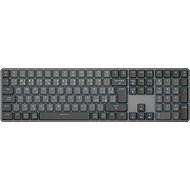
Interested in reviews of Eternico K800 Wireless grey - CZ/SK? It got 4.6 out of 5 stars from our customers. Find specific customer reviews of Eternico K800 Wireless grey - CZ/SK below. We will appreciate if you also share your experiences with Eternico K800 Wireless grey - CZ/SK after purchasing.
I admit I had higher expectations for this keyboard, but for the price – 1119 Kč + 49 Kč delivery – I'll let it slide. Personally, I won't be using the 2.4GHz / Bluetooth, as I have it connected via cable, so for me it's unnecessary technology with several extra useless keys. The switches could have been Gateron Red (linear) or even low-profile switches. So, apart from some cosmetic defects from manufacturing, the weak backlighting, and the absence of a keycap puller, everything is OK. In any case, I'm looking forward to a new version of the keyboard that will be improved and modified based on reviews, hopefully.
Low-profile keys (the only downside is the high-profile switches and that they aren't Gateron Red linear)
The entire layout is backlit (unfortunately, there's only a top LED, and the CZ/SK layout and the bottom part of the keys are dimly lit)
The slight spherical curve of the keys (although it could do with being even less curved, or not curved at all).
Lock Screen key
The keyboard doesn't go to sleep when connected via USB.
When you unplug the USB in OFF mode (when connected via cable), it remembers the settings.
Nice design, glossy edges on the aluminium plate, aluminium plate under the keys (the sides could have also been aluminium instead of plastic)
There's currently nothing better on the market at this price if you're looking for low-profile keys along with RGB and a minimalist design (I definitely wouldn't buy anything cheaper = absolutely awful, and more expensive ones are often inadequate or only have single-colour backlighting, or the entire layout isn't backlit).
On several keys, the layout text isn't centred but is right up against the left edge, so it looks like someone's hand slipped during production. (see photo)
There are lumps / beads of paint on several keys. (see photo)
Due to the two points mentioned above, I ordered another keyboard for comparison to see if it was just a bad piece - but unfortunately, the lumps/balls are there too (see photo). The aligned layout is only slightly off on a few keys, but for a keyboard with a standard price of 1,599 CZK, this should definitely not be the case!
Scratches on the glossy side of the aluminium plate - the border. (see photo)
I'm keeping one until there's a better alternative or a new version. But it's disgusting. I don't know if I'm just lucky with these aesthetic defects from the factory, but on multiple units?! I recommend changing the manufacturer to one that at least has proper quality control for all its items. On a keyboard with a normal price of 1,599 Kč, I certainly don't want lumps/blobs of paint on the keys!
! The backlighting is dim, even at the maximum possible brightness level of 4 out of 4. This might be due to a poor translucent material for the layout. The top part of the keys is more illuminated (because the LED in the switch is at the top), but the bottom part of the keys, where for example *, F1-F12, the Czech layout, etc., are located, is dimly lit, even the main Enter key. It needs an LED at both the top and bottom of the switch!
! The keys are unnecessarily trimmed too much on the sides and bottom. The top edge is great, and all the edges of the keys could be like that!
The switches aren't loud but they're not silent either, so somewhere in the middle.
2x FN keys, the right one next to the spacebar is absolutely useless! The right one should be a context menu instead!
The 1.5m cable length is simply not enough if you have a large desk, monitor arms, even with the PC on the desk, especially when aiming for better cable management (you can always hide a longer cable, but a short one is a problem).
! There are no gaps between Esc-F1, F4-F5, F8-F9 (those two keys, search and FN Lock next to F12, are absolutely useless at the expense of the gaps, I'd genuinely like to know who actually uses these two pointless keys). This makes tactile orientation for F1, for example, worse when everything is squashed together and you're used to a gap and have to stretch your finger further.
! The caps lock light is white, the fn lock and num lock lights are white, and the lock screen light is blue, which is awful – I want all the keys and the indicator LEDs to have the same full RGB.
Indicator LEDs (ideally RGB to match the currently set colour of the switches) for Fn Lock, Num Lock and Caps Lock could have been placed above the arrow keys where there's free space. (Instead of the constant white and blue backlighting of the keys) Especially since the numpad section already has BT1, BT2 and Home.
! The packaging does not include a Keycap Puller, which is essential for cleaning the keyboard! I assume the keys are not fused to the switches. So, if you don't have a puller, cleaning it will be fun.
The last two points are more a matter of opinion: The eternico logotype on the bottom left side is unnecessary, although it's better than if it were above the arrow keys like on the MKS7100. For minimalists, the label on the bottom is more than enough; the logo really doesn't add any marketing value, but that's a problem with all manufacturers, with some exceptions that just don't have a CZ layout.
Plain light cardboard packaging, the keyboard is only wrapped in thin paper. If you like to display your boxes, you're out of luck here.
I tried the Eternico K800F and the Keychron K5 Max (Gateron RGB Backlight Red Switch) keyboards. In short, the Keychron is a bit better in every respect. The Keychron is lower at the front edge and has two height settings for its feet to raise it. It's also smaller overall (the attached photo is misleading), has nicer keycaps, a better key layout, and much greater backlight customisation options in the web app (for example, you can change the backlighting of the num lock when it's on), where you can also remap keys. Plus, there are more accessories in the box (like keycaps for Windows). If the Eternico is better at anything, it’s the maximum backlight brightness, which, unlike the K5, is perfectly usable even in daylight, and its simple, practical packaging. What I find absolutely terrible about the Eternico, on the other hand, is the glossy trim along the entire edge of the keyboard, which reflects light everywhere. I'd say both keyboards are the absolute top in their price range and in the mechanical low-profile segment (especially with backlit Czech localisation), and you won't find anything better. The Keychron keyboard isn't that much better for double the price, but if you want to treat yourself, it's the one you'll keep.
Verified purchase - review from a price comparison website
Satisfied after a short period of use. |It's very comfortable and nice to type on the keyboard (my first mechanical one). The setup is manageable with the downloaded instructions. With my previous keyboard, I used the multifunction keys in the top row for moving 'back' and 'forward'. My previous Rapoo keyboard had them, but unfortunately, this one doesn't. For me, that's the feature it's missing to be perfect.
perfect processing
An excellent buy for this special offer price.
following the instructions, it's quite easy to set up
After a short time using it, it's excellent to type on.
the two keys for "back" and "forward" are missing from the top row
Verified purchase - review from a price comparison website
the keyboard is lightweight, has no unnecessary edges around the edges and therefore foldable
the colour combination of black and grey looks very interesting, enter is big, backspace is big, left shift is short, and next to it is "\|", which suits me, it has Czech/Slovak prints, it looks like it is moulded into the buttons, but the backlighting of secondary characters is weaker, mainly primary characters are backlighted
the backlight has 4 levels of intensity and several homogeneous colors, such as white, red, blue, green, etc. let's say about 6 to 10 colors. The rest of the color options are just different flashing effects for teenagers, but even here you can adjust the intensity and even the speed of the flashing (I don't know why, but ok, it's there)
connectivity is via USB-A dogle very small size, worked immediately, I did not have to deal with anything, then there is the option of 2x bluetooth, it also works ok, paired to 2 devices, then the possibility of connecting via the supplied cable USB-A -> USB-C, when it really goes through the cable: ) In the back of the slide switch for switching these modes, including the Win/Mac slide switch
the press of the keys is sure, slight resistance as with a normal "scissor" keyboard, but the mechanics can be felt, the buttons can be removed, so I swapped "Z for Y", but I preferred to leave the switches alone
The keyboard is slightly loud from my personal point of view, but with a very pleasant mechanical sound. But if I compare it with Logitech MX keys, then it is significantly louder
low profile cap keys - low profile, ideal, short stroke
for about 1300Kč relatively good price
the manual is miniature, but the keyboard setup is intuitive due to clear descriptions
The keyboard came with a "QWERTZ" layout. I immediately switched the Z and Y
From 30% of the battery, the top right key flashes disturbingly red, I'll probably return it because of this, or punch out the led and lose my warranty
doesn't have a sleep button, I'll have to configure shortcuts
With the backlight on, less battery life than I would have expected
The keyboard is very pleasant to touch and to type on (how to play games on it I don't know). I only use it connected via USB. I'd prefer it to be a series with F1 keys. F12 was a bit offset and there were spaces between the keys for better orientation on the keyboard. This way it's crammed too much on top of each other and I have to use those keys (F1. F12) sometimes I search unnecessarily or get confused. I might as well have a little more border around the keyboard. Anyway, the keyboard is good and I could recommend it and if I get used to the F1s crammed on it. F12 keys, then hopefully it will be even better.
Pleasant to write on (both touch and sound).
Backlight (fortunately, it can be set to one non-flashing colour).
Lock F1. F12 keys that primarily function as F1. F12 keys and not as multimedia keys.
The keyboard can only be connected via USB (no need to use the wireless connection).
Locating the screen lock above the "-" key on the numeric keypad. Sometimes I accidentally press it in my haste. (indented top row would help with that, I think)
Unopposed top row F1. F12 from the bottom rows and with no spaces between the keys is a bit cluttered.
CapsLock and NumLock are backlit when they are active (which is +). But the downside is that the backlighting is not clearly visible, especially when I have the whole keyboard backlighting on.
It doesn't have an app to adjust the backlight.
0 ×Report
Automatic translation
Try our cookies
Alza.cz a. s., Company identification number 27082440, use cookies and other data to ensure the proper functioning of the website and, with your consent, also, among other things, to personalize advertising and the content of our websites. By clicking on the “I understand“ button, you agree to the use of cookies and the transfer of data regarding the behavior on the website for displaying targeted advertising on social networks and advertising networks on other websites.