
Reviews Bosch BCRDW3BX Spotless Max Cam
Interested in reviews of Bosch BCRDW3BX Spotless Max Cam? It got 4.7 out of 5 stars from our customers. Find specific customer reviews of Bosch BCRDW3BX Spotless Max Cam below. We will appreciate if you also share your experiences with Bosch BCRDW3BX Spotless Max Cam after purchasing.
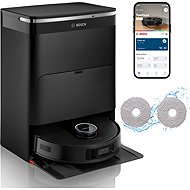
Bosch BCRDW3BX Spotless Max Cam
Currently Unavailable

Ivo, Ostrava
Rated 01/11/2026, variant Bosch BCRDW3BX Spotless Max Cam
Verified purchase
it does an excellent job of cleaning (that's what we bought it for)
The app is a disaster! It somehow forgets scheduled tasks. But it forgets them by deleting them. You program it, it carries out the first scheduled task, and then it DELETES everything that was programmed, so nothing is scheduled anymore.
0 ×Report
Automatic translation
Anonymous customer
Rated 30/10/2026, variant Bosch BCRDW3BX Spotless Max Cam
Verified purchase
It has saved me a lot of work with vacuuming and mopping the floor, I barely do it at all now.
handles cleaning products as well
0 ×Report
Automatic translation

Eva, Libeznice
Rated 29/10/2026, variant Bosch BCRDW3BX Spotless Max Cam
Verified purchase
Finally coming home from work to a tidy flat : -).
Vacuums and mops really very well
It maps the room intelligently
scheduled cleaning works brilliantly
simple and functional app
Data remains in the EU
Higher price, but it was bought on sale so SUPER
0 ×Report
Automatic translation

Martin, Kladno
Rated 18/10/2026, variant Bosch BCRDW3BX Spotless Max Cam
Verified purchase
The vacuum cleaner met my expectations; it vacuums and mops my 80m2 floor area brilliantly, not missing the corners, thresholds, or even the floor-standing clothes airer. The app is in English and completely intuitive, easy to pair and control. The only thing I have to criticise is that it misjudges the height of the sofa and goes underneath it, where it gets stuck on the LiDAR turret. I had to raise the legs by a few millimetres and now it can clean under there too. It tells you when it needs maintenance, refilling, or when the water tank needs emptying. I also expected to be able to stream the video from the vacuum's camera to the app, but I was mistaken about that.
Sufficient suction power, even for carpets
The app and the voice are in Czech
It lets you know when it needs maintenance.
Intuitive control
Most common obstacles are not a problem
Sometimes it misjudges the height of furniture it can and can't fit under.
A little noisier than you'd expect.
It doesn't stream video from the camera to the app, but I don't see that as a major drawback.
0 ×Report
Automatic translation

Markéta, Dobruška
Rated 14/10/2026, variant Bosch BCRDW3BX Spotless Max Cam
Verified purchase
easy pairing of the app with the robot
clear controls via the mobile app
Czech language, including the voice assistant in the robot.
quiet operation of the vacuum cleaner
vacuums and mops (the brushes with water rotate, it's not just wiping with a damp cloth)
long run time on a single charge
Only sees obstacles that are taller than the robot
large size docking station
Noisy cleaning (emptying the dirt from the robot) after it returns to the docking station
0 ×Report
Automatic translation

Petr, Ústí nad Labem
Rated 14/10/2026, variant Bosch BCRDW3BX Spotless Max Cam
Verified purchase
As end users, we are generally happy with the vacuum cleaner; after two weeks of use, I have no complaints. It's perfectly suitable for the daily cleaning of a 70m2 flat.
Vacuums, mops, dries
It feels sturdy and high-quality.
Navigates the flat well, gets over standard thresholds.
Relatively quiet, maintenance-free
It reminds you about necessary maintenance via the app
Manuals, instructions and tips available in the app, and they're in English too
Is it possible to divide the flat into individual zones?
0 ×Report
Automatic translation
Veronika, Řevnice
Rated 14/10/2026, variant Bosch BCRDW3BX Spotless Max Cam
Verified purchase
Overall, we're pleased with the vacuum cleaner. It vacuums and mops well, including dog hair, and it handles the usual daily clean-up, so we don't have to get the classic vacuum out as often. I also appreciate the quality build. For me, the weaker point is the rather complicated connection to the app and occasional difficulties when it's trying to return to the docking station.
Quality workmanship
It can handle dog hair.
Makes everyday cleaning easier
More difficult to connect to the app
Sometimes it has trouble returning to the docking station
Sometimes it needs a little assistance
0 ×Report
Automatic translation
Jan, Praha
Rated 11/10/2026, variant Bosch BCRDW3BX Spotless Max Cam
Verified purchase
For my first experience with a robot vacuum, it's not bad. The vacuum was carefully packaged and assembling the docking station was more than simple. Following the instructions, the vacuum connects via the Home Connect app, which is reliable to a certain extent, but not perfect. Once the vacuum is paired with the app via WiFi, it creates an initial map in which it will navigate. Mapping must be started exclusively from the docking station. If you start mapping away from it, for example in another room, the vacuum will map successfully, but after completing the task, it will return to where it started. In none of the three test cases could it find and recognise the docking station. Similarly, even when it passed by it, it didn't include it in the map being created. The robot is relatively quiet on hard floors, but occasionally you can hear rattling sounds from the plastic moving parts of the vacuum. When it moves onto a carpet, it recognises the change in surface and increases the suction power, which is still relatively quiet. So, the vacuum can easily operate at night.
The flip-out mop works very well; it gets into corners without any problems. It doesn't leave puddles. With plain water, it only mops up very minor dirt from the floor. To get rid of tougher dirt, you need to buy a compatible cleaning solution (BOSCH BHZRCD), which can tackle things like dried-on food and drink stains. The docking station does not have a separate tank for the cleaning solution. You have to mix it in the correct ratio with water in the clean water tank.
During vacuuming and mopping on Eco mode, the robot's battery only went from 100% down to 72% in 1.5 hours of work, which is excellent. You need to bear in mind that it takes frequent service breaks to swap dirty water for clean and to empty the dustbin. So, if it's a long way from the docking station, it takes a while to get there and then to return to where it left off. A couple of times, the robot got a bit lost on its way back and 'wandered around', but it always managed to get back to the original spot in the end. The only problem occurred after a few days when the vacuum disconnected itself from the Home Connect app, where it appeared as "unavailable". I had to manually turn the vacuum on, and after a while, it reconnected to the WiFi network. This happened several more times. Since I have a complex LAN network at home with Ubiquiti components, I looked for the problem in the settings there. After several days of testing and trying various network settings, I concluded that the vacuum has a problem with switching between two Access Points and with newer network protocols and standards. The vacuum can only operate on the WiFi 4 standard; it has issues with newer ones. It also has a problem connecting to a hidden SSID. It's also not possible to change the network in the app, as the app always shows an error message: "Changing the network is blocked - You are starting Home Connect outside your home. This means you are not on the same network as your home appliance," even though my phone is connected to the same network. So you can't switch from DHCP to a static address. Assigning an IP address by MAC device doesn't work either. At the switch level, the address is assigned by MAC, but this change is not reflected in the Home Connect app, where the DHCP address remains. This results in the vacuum getting confused and subsequently disconnecting from the app. The only way to change the network then is to perform a network reset using the button on the vacuum itself, which unfortunately resets the entire vacuum, including all previous settings and maps.
So, if you have Ubiquiti network components and multiple APs at home, create a separate WiFi network and assign it to only one AP (usually the one closest to the vacuum, to which it will always reconnect) and in the "IoT Optimization" section, enable "Force WiFi 4 mode", "DTIM interval lock", and "Lock 2.4 GHz to Channel 6". In this configuration, the vacuum will always stay connected.
Feels high-quality, nice design
The manufacturer pays attention to data security (servers in the EU, GDPR)
The hoover interface and the app are both in Czech.
It carefully avoids obstacles and can get over higher bevelled thresholds.
Manuals, instructions and tips directly in the app
Bosch Czech support
Consumables usage counter and regular service reminder
Detailed map editing, setting up zones (vacuum only, mop only, etc.)
The option to adjust the thoroughness of the vacuuming/mopping (quick and standard, or slow and deep)
The option to vacuum everywhere or just in certain rooms
Network settings for the vacuum cleaner in the Home Connect app
The network settings do not allow you to set a static IP address. Although the option for a static address is present in the connection settings, an address is always assigned via DHCP.
Old network protocols and standards, which may have problems with current network components
Resetting the WiFi network on the vacuum cleaner will cause a total reset of the vacuum cleaner's settings, incl. the consumables counter.
Doesn't support MAC address filtering
Minor leaks from the connectors on the clean and dirty water tanks. When inserting the clean and dirty water tanks into the docking station, they fit onto a connector that draws water from/to the tank. The connection between the tank and the connector isn't completely tight, so a small puddle of water forms around the connectors.
0 ×Report
Automatic translation

Michal, Hodkovice nad Mohelkou
Rated 11/10/2026, variant Bosch BCRDW3BX Spotless Max Cam
Verified purchase
vacuums and wipes at the same time
option to set the mop washing frequency
The docking station works perfectly.
has no problem with cat hair
pairing without problems
expensive accessories
Mirrors and patio doors confuse it – you have to draw the room boundaries in the app
You can't skip the mop drying process, e.g. to let it dry in the sun.
0 ×Report
Automatic translation
Jan, Praha 5
Rated 11/10/2026, variant Bosch BCRDW3BX Spotless Max Cam
Verified purchase
Although I'm still waiting for a Wi-Fi connection in my new house and can't take full advantage of all of Robo's features, my cleaning is done easily and with no fuss. I'm satisfied and look forward to using the other functions with Wi-Fi.
well oriented
clear maps
it runs steadily and securely
cleans perfectly
quality mopping
easy operation
0 ×Report
Automatic translation