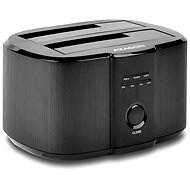
Interested in reviews of AXAGON ADSA-ST DUAL HDD? It got 4.6 out of 5 stars from our customers. Find specific customer reviews of AXAGON ADSA-ST DUAL HDD below. We will appreciate if you also share your experiences with AXAGON ADSA-ST DUAL HDD after purchasing.
Works exactly as it should, can be operated by a child, price is reasonable.
not
0 ×Report
Automatic translation
Jozef, Ľubotice
Rated 09/02/2019, variant AXAGON ADSA-ST DUAL HDD
Verified purchase
It does exactly what it's supposed to, some drives need to be formatted in the operating system, higher PC knowledge is required. SATA drives only, not ATA. It goes reliably and quietly.
0 ×Report
Automatic translation
Josef, Mladá Boleslav 1
Rated 07/02/2019, variant AXAGON ADSA-ST DUAL HDD
Verified purchase
She looks really pretty. It's subtle and petite.
You can't really make toast in it.
0 ×Report
Automatic translation
Miroslav, Praha 8 - Bohnice
Rated 29/01/2019, variant AXAGON ADSA-ST DUAL HDD
Verified purchase
Easy to use.
Speed.
It does not support older IDEs.
0 ×Report
Automatic translation
Jiří, Chomutov
Rated 01/01/2019, variant AXAGON ADSA-ST DUAL HDD
Verified purchase
Quick
Without installation
It's working as it should.
vibrates slightly when copying from disk to disk, I'll back it up
0 ×Report
Automatic translation
Peter, Bratislava
Rated 27/12/2018, variant AXAGON ADSA-ST DUAL HDD
Verified purchase
nice design
clear labels describing the source and destination disk
the name of the drive is not displayed directly, but the name of the docking station (not all do this)
smartctl does not support this docking station, you need to add the -d sat parameter
0 ×Report
Automatic translation
Jan, Česká Lípa 6
Rated 18/12/2018, variant AXAGON ADSA-ST DUAL HDD
Verified purchase
It works great and fast.
It can really clone fast (depending on the size of the disk).
Elegant appearance, quiet.
I like the LED indication during cloning.
It can only clone to the same size or larger disk (it will NOT clone to a smaller disk)
If it clones to a larger disk it can't just clone the data, it creates a partition on the new disk the same size as the cloned disk and the remaining space remains unallocated (e.g: 500GB to 1000GB = 500GB clone + 500GB unassigned)
0 ×Report
Automatic translation
Try our cookies
Alza.cz a. s., Company identification number 27082440, uses cookies to ensure the functionality of the website and with your consent also to personalisage the content of our website. By clicking on the “I understand“ button, you agree to the use of cookies and the transfer of data regarding the behavior on the website for displaying targeted advertising on social networks and advertising networks on other websites.