
Reviews ASUS ROG Zephyrus G14 GA403UU-NEBULA065W Eclipse Gray all-metal
Interested in reviews of ASUS ROG Zephyrus G14 GA403UU-NEBULA065W Eclipse Gray all-metal? It got 4.7 out of 5 stars from our customers. Find specific customer reviews of ASUS ROG Zephyrus G14 GA403UU-NEBULA065W Eclipse Gray all-metal below. We will appreciate if you also share your experiences with ASUS ROG Zephyrus G14 GA403UU-NEBULA065W Eclipse Gray all-metal after purchasing.
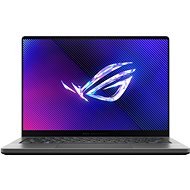
ASUS ROG Zephyrus G14 GA403UU-NEBULA065W Eclipse Gray all-metal
Discontinued

Jan, Beroun
Rated 08/02/2025, variant ASUS ROG Zephyrus G14 GA403UU-NEBULA065W Eclipse Gray all-metal
Verified purchase - review from a price comparison website
I am very satisfied with the nb. The cons listed in the review are just annoying flies on an otherwise good computer. The price/performance ratio is excellent. More powerful HW in a 14" body doesn't make much sense, even the installed Ryzen 7 8845HS and RTX4050 can't be kept at full power.
The machine is really quiet when working in silent mode.
Excellent display. 100% AdobeRGB and sRGB coverage, 3K resolution, good for photo editing.
Decent connectivity. For me, the USB-C power option and the card reader were key.
Powerful processor and GPU to work with AI (e.g. Topaz PhotoAI).
For a relatively powerful notebook, a decent look (after a few configuration tweaks) and a compact design.
The 40W USB-C power supply is sufficient for normal work. No need to lug around a large and heavy dedicated 180W power supply with a non-standard connector. Just travel with one usb power supply for laptop, phone, camera, etc.
Decent non-scratchy sound, totally fine for a Netflix series.
I don't have a machine primarily for gaming and I don't want to bake it for hours at high load. However, after a few minutes of playing Horizon Forbidden West, it looks like the RTX4050 is able to rock the game in a way that is a joy to watch. The machine does not make an unpleasant noise.
No drivers needed to be installed. Everything's running at full speed straight out of the box. I usually find that some peripheral (wifi, card reader) doesn't run nearly at full power without a driver.
I'm not quite the target audience for this laptop. I need a powerful machine for work and I don't really like the infantile gaming elements of the system. I'm annoyed by the bloody ROG logo and the sound of the sword swishing at boot. The disco-style keyboard undertones and the light snake on the lid are perhaps only attractive to teenagers. Fortunately, everything except the logo can be turned off.
Some pretty important separate keys for typing like ins, pg up, pg down, home, end disappeared from the 14" keyboard. As a programmer, I'm pretty annoyed. There would be space, but we're saving where we don't have it. I also had them on a 12" laptop a few years ago. The overall layout doesn't really work for me. When pressing Enter, something keeps getting tangled under my fingers.
Battery life doesn't do much for me. The tests state 9-12h at normal work. When browsing the web and occasionally watching youtube in power saving mode, the battery is at 20% after 3 hours. Realistically, I get about 4h of normal work.
It heats up a lot underneath even with light work. You can only work with it on the table for more than a few minutes. It burns downright unpleasantly in the thighs.
Switching power/power modes in the ArmourCrate app works weird. You probably need to be logged in as administrator and restart the pc, but the app doesn't want admin rights - it just works sort of half-heartedly without them. In power saving mode, the automatic switching of demanding applications to the dedicated GPU when the power supply is connected does not work. From what I've observed, it probably requires a dedicated power supply and USB-C isn't enough. It's definitely unintuitive, I've been playing with it for a week now and I don't understand exactly how it works.
Too bad it doesn't have a fingerprint reader
0 ×Report
Automatic translation

Anonymous customer
Rated 27/12/2024, variant ASUS ROG Zephyrus G14 GA403UU-NEBULA065W Eclipse Gray all-metal
Verified purchase
For me, a completely unbeatable fusion of a gaming laptop and a sleek work laptop.
full-metal, detailed, beautifully crafted notebook
detailed display, nice colours
nice sound and bass
comfortable keyboard
charging via USB-C (100W original. charger)
Wide range of active cooling settings and power profiles (power limitation according to temperature, etc. )
with turbo boost off temperatures up to 75
Linux officially supported by Asus, they have good tutorials and ready made software
lightweight, 14" MacBook
Fedora 41 and Win10 without problems, everything works and can be set up
very thin and (feeling) fragile construction, visibly bends
slight cracking in the hinges (plastic strip at the hinges)
the connectors are looser, USB-C definitely doesn't have the rigidity of a MacBook, HDMI is also looser. The power connector wobbles a bit
The LED strip on the lid is more of a beauty flaw for me, I haven't found a use for it
no groove for easier opening of the lid
problems with WiFi 6 card (both Intel and origo MediaTek) on WiFi 4. 1/4 speed compared to other devices on the network. Can be resolved with WiFi 5 card
can't safely fit a double-sided SSD
absence of a second SSD slot. Fortunately, it has a card slot
louder cooling under load
liquid metal is a red flag for me, as a precaution I do not operate in a tilted position
0 ×Report
Automatic translation
Ondřej, Paršovice
Rated 14/09/2024, variant ASUS ROG Zephyrus G14 GA403UU-NEBULA065W Eclipse Gray all-metal
Verified purchase
beautiful and simple design
the ability to modify the look and feel of the Armory create app
processor and graphics performance
low weight
due to the thin design, one would expect more heating and fan noise at higher loads, but this is nothing major. The top center of the keyboard is thermal even at lower power.
I would appreciate a smaller charging adapter (if at all possible)
0 ×Report
Automatic translation