
Reviews ASUS NUC 14 Pro+ NUC14RVSU5000R2
Interested in reviews of ASUS NUC 14 Pro+ NUC14RVSU5000R2? It got 4.5 out of 5 stars from our customers. Find specific customer reviews of ASUS NUC 14 Pro+ NUC14RVSU5000R2 below. We will appreciate if you also share your experiences with ASUS NUC 14 Pro+ NUC14RVSU5000R2 after purchasing.
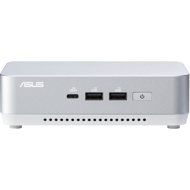
ASUS NUC 14 Pro+ NUC14RVSU5000R2
Currently Unavailable

Tomáš, Mníšek pod Brdy
Rated 22/01/2025, variant ASUS NUC 14 Pro+ NUC14RVSU5000R2
Verified purchase
No way on the table. It's a blower and no matter what you do, you don't want this device on your desk. So in that sense it's nonsense. It's a shame. Maybe in time someone will come up with some addition that will allow some sort of cooling tower to be put on this cube. I'd buy it in a heartbeat. I got it just for music production, and all this beautiful gear ended up locked in a closet with my other noisy and warm hardware. Due to the fact that I have this device more than 2 meters away from the LCD with KVM, I cannot use USB-C Video with 4K 144Hz, but only 4K 60Hz via HDMI. It's a bit of a break. On the other hand, when the device is hidden, it works without me registering it and is reliable. No. You really can't tune the system so that the blower inside doesn't work. I've tried everything. At the same time, it throttles thermally according to the analyzers, which is an insufficient cooling capacity. PL1 and PL2 throttled to 45 and 50W.
power
I operate in the commode because of the fan noise

0 ×Report
Automatic translation

Petr, Praha 5
Rated 14/09/2024, variant ASUS NUC 14 Pro+ NUC14RVSU9000R2
Verified purchase
I purchased the mini computer with the intention of running home automation with Home Assistant, but also to use it for video editing, drone emulation, etc. The intention was to install Debian, but it is not supported, only Widows, RedHat and Ubuntu are supported. I tried Ubuntu first, but after realizing that it was far from Debian, I finally uninstalled it and installed Windows 11 Pro. However, even the installation of Windows is not seamless, Windows does not recognize either WiFi or LAN adapter, so it is necessary to reinstall without a network, which Microsoft quite vehemently opposes, and after installation apply all Asus-supplied drivers.
I have 64GB RAM, but 32GB and 4TB SSD WD_BLACK 850 in 2280 slot would be enough. 4TB is the maximum supported size. The computer still includes a second 2242 slot, which can hold a maximum of 2TB SSD. It's a shame that both slots are not type 2280. With the drive, the computer achieves read and write speeds of around 5GB/s. The computer also has two Tunderbold 4 ports, here the speed on the same drive in a USB4 enclosure is around 3GB/s. I've tried virtually and graphics performance on the Velocidrone emulator at 4k and 60Hz and max detail and absolutely no problems. LiftOff at the same setting already complains about the lack of graphics, but somehow it's not noticeable in the picture. Rendering video in Davinci 4k/60Hz runs at about half the playback speed. Even the rendering during editing is acceptable, MAC is far from it, but quite satisfactory considering the price.
As far as noise is concerned, it can't be said that the computer is inaudible, the fan turns on at 35 degrees and turns on immediately with every more demanding task, but it's not distracting.
The problem with Windows is that the computer does not support the classic sleep mode, but the so-called. modern standby. The result is that if you want the computer to never go to sleep, you need to set the display to never go to sleep, just disabling sleep or shutting down the disk is not enough. Even PowerToy installation does not prevent anything and the computer goes into standby, from which it will not be woken up even by a scheduled task. This is a significant problem in home automation, so it is necessary to disable Modern Standby S0 in the registers and set the classic S3.
A very powerful computer in a very small body
2 Thunderbold 4 ports, 3GB/s write and read from external SSD
Nice design, solid aluminium housing
Can handle 4 4k displays or 2 8k
Graphics with satisfactory performance for most applications
5GB/s write and read to internal SSD
Does not support Debian (may have driver issues), Microsoft does not have drivers for network on install, so even more difficult to install Windows
In Windows, it goes to Modern standby
0 ×Report
Automatic translation