
This page contains frequently asked questions about OMEN 16-wf1900nc Shadow Black. If you are considering buying this product, you may want to read the discussion or ask more questions about OMEN 16-wf1900nc Shadow Black. They will be answered by our specialists.
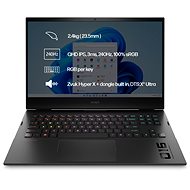
Je mozne zmenit farbu podsvietenia klavesnice, po pripade to uplne vypnut? Predpokladam ze ano, ale radsej sa spytam. Dakujem
Alza Expert,10. 5. 2025
Děkujeme za dotaz. Áno, je možné zmeniť farbu podsvietenia klávesnice na notebooku OMEN 16-wf1900nc Shadow Black, alebo ho úplne vypnúť. Postupujte podľa týchto krokov:
Omen Gaming Hub: Otvorte aplikáciu Omen Gaming Hub, ktorá je predinštalovaná na vašom notebooku. V sekcii Lighting môžete nastaviť farbu podsvietenia a tiež ho úplne vypnúť.
Fn + F5: Použite kombináciu klávesov Fn + F5 na cyklovanie medzi rôznymi úrovňami podsvietenia, vrátane úplného vypnutia.
BIOS/UEFI: V niektorých prípadoch môžete upraviť podsvietenie klávesnice aj cez nastavenia BIOS/UEFI. Počas bootovania stlačte klávesy ako F2, Esc alebo Del a hľadajte nastavenia týkajúce sa podsvietenia klávesnice
Alza.cz a. s., Company identification number 27082440, uses cookies to ensure the functionality of the website and with your consent also to personalisage the content of our website. By clicking on the “I understand“ button, you agree to the use of cookies and the transfer of data regarding the behavior on the website for displaying targeted advertising on social networks and advertising networks on other websites.