
This page contains frequently asked questions about ASUS Marshmallow KW100 Green (Copilot key) - CZ/SK. If you are considering buying this product, you may want to read the discussion or ask more questions about ASUS Marshmallow KW100 Green (Copilot key) - CZ/SK. They will be answered by our specialists.
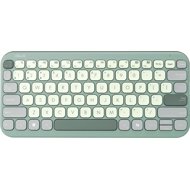
ASUS Marshmallow KW100 Green (Copilot key) - CZ/SK
You are using the photos of the previous model, which does not have the copilot key.
Look at this link, the copilot key is the 2nd key after the space bar.
External Link
Alza Expert,14. 1. 2025
Thank you for your inquiry. We apologize for any misunderstanding regarding the product photos. We will forward your comment to our team to check the situation and update the photos on our store if necessary.
Miloš Pikala,26. 2. 2025
Po pripojení k telefónu Samsung s Android 14 je rozloženie slovenskej klávesnice QWERTY. Ako sa dá nastaviť QWERTYZ? Vďaka!
Alza Expert,28. 2. 2025
Děkujeme za váš dotaz. Pro změnu rozložení klávesnice na QWERTYZ v telefonu Samsung s Android 14 doporučujeme následující kroky: 1. Otevřete Nastavení. 2. Přejděte do sekce 'Jazyk a vstup'. 3. Vyberte 'Klávesnice' a poté 'Samsung klávesnice'. 4. Zde byste měli mít možnost změnit rozložení klávesnice na QWERTYZ.
Alza.cz a. s., Company identification number 27082440, uses cookies to ensure the functionality of the website and with your consent also to personalisage the content of our website. By clicking on the “I understand“ button, you agree to the use of cookies and the transfer of data regarding the behavior on the website for displaying targeted advertising on social networks and advertising networks on other websites.