
Glorious Model O Minus (Matte White)
Don't like the alternatives?
Choose from the full offer
Glorious Model O Minus (Matte White)
Lightweight Glorious Model O Minus gaming mouse with up to 12,000 DPI resolution and RGB backlighting
If you're looking for a quality sidekick to help you tackle even the biggest gaming battles, you've just found it in the form of the Glorious Model O Minus mouse. It is a lightweight gaming mouse with 6 buttons, a precise optical sensor, ergonomic design and a low weight of only 58 g. The Glorious Model O Minus is a mouse that is designed to play FPS, MOBA, MMO, Battle Royale and other competitive games.

Key Benefits of the Glorious Model O Minus Gaming Mouse, Matte White
- Excellent gaming mouse
- PixArt PMW3360 precision optical sensor with sensitivity up to 12,000 DPI
- Response time 1 ms
- Acceleration 50G
- Durable Omron switches
- Extra light weight of only 58 grams
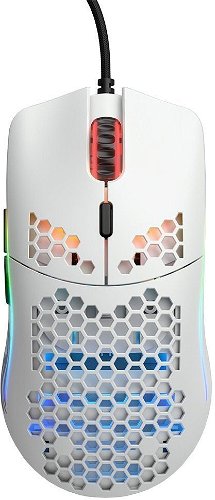
- Stylish perforated design
- Total of 8 RGB LED lighting effects
- Connection via classic USB-A

Stylish perforated construction
After many hours of gaming, you'll appreciate that the Glorious Model O Minus mouse weighs just 58 grams. Thanks to its perforated construction, the Glorious gaming mouse is not only lightweight, but also design-wise very good.

Flexible cable with 2m length
The Glorious Model O Minus gaming mouse connects to the PC using a cable with a classic USB-A connector. The cable itself is 2 metres long, extra flexible, durable and won't get stuck on obstacles.

The Glorious gaming mouse has a Pixart 3360 optical sensor
The Glorious Model O Minus optical mouse boasts 50G acceleration and a Pixart 3360 sensor with a resolution of up to 12,000 DPI. Along with a top-notch sensor, the mouse's precise movement is enhanced by a scanning speed of up to 1000 Hz and an associated response time of just 1 ms.

Software Glorious CORE 2.0
Use Glorious CORE 2.0 software to remap the Glorious Model O Minus gaming mouse button functions, fine-tune sensor behavior, adjust lighting and adjust response time. Using the software is an option, as the mouse will of course work as soon as you connect it to a free USB port.
Specifications
Dimensions and weight
Connection
Mouse interface
Mouse use
Sensor
Mouse buttons
Other mouse features
Colour
| Code: | Gm10a4 |
| Links: | Producer's Website: |